
What's new in Mermaid Studio 2026.2.4?
Released:
This release is largely a class diagram overhaul. Inline documentation, inlay hints, a full structure view with package grouping, gutter icons, live templates, smarter completions, two new intentions, and additional supported syntax forms all land for class diagrams. Outside class diagrams, Enter-key brace expansion is now available in every edition across every brace-using diagram type, and the default formatter indent has been flipped to one level below the diagram-type keyword to match upstream Mermaid layout.
Highlights
Section titled “Highlights”Inline documentation
Section titled “Inline documentation”Hover or press
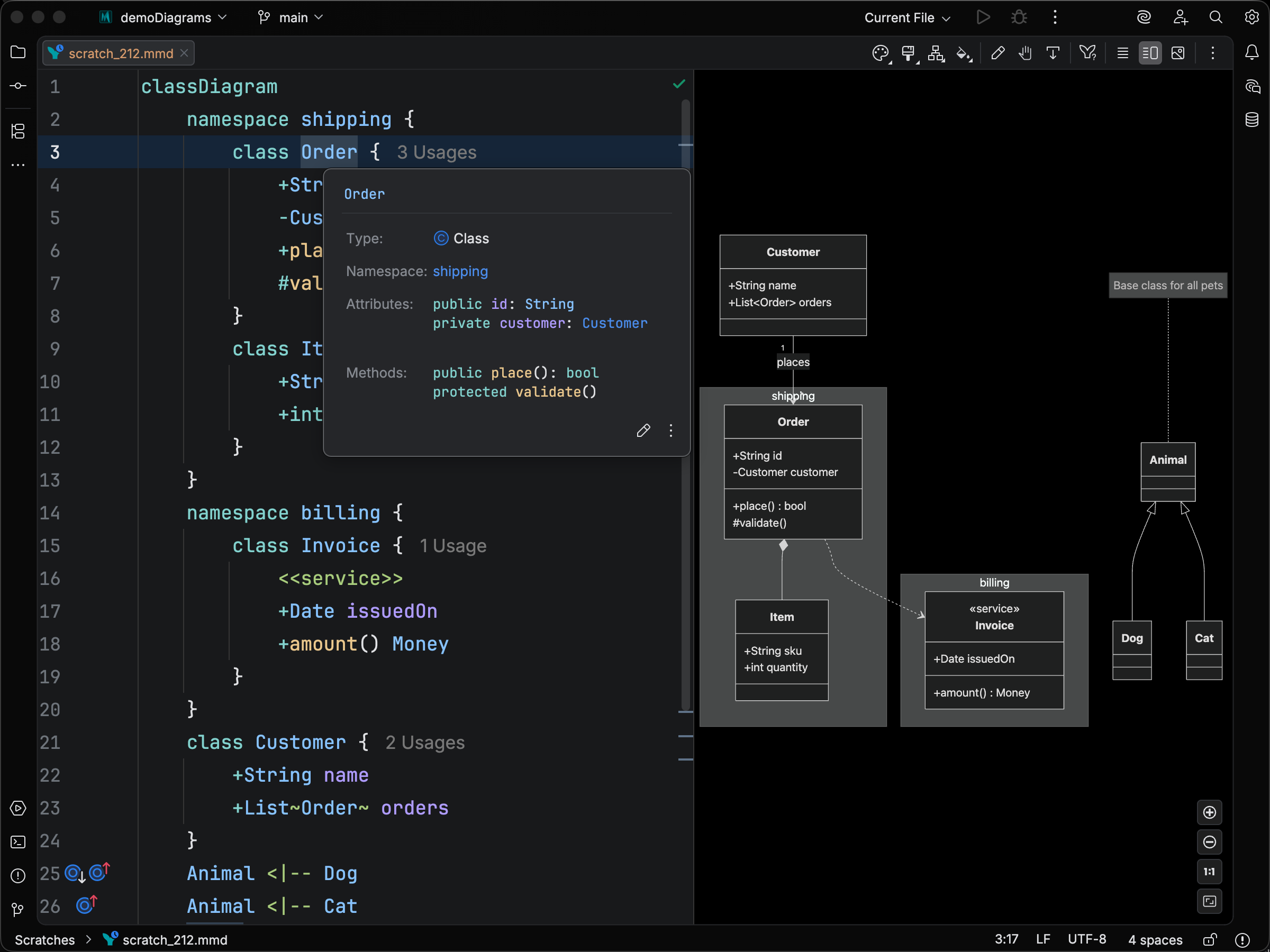
Visibility and modifier inlay hints
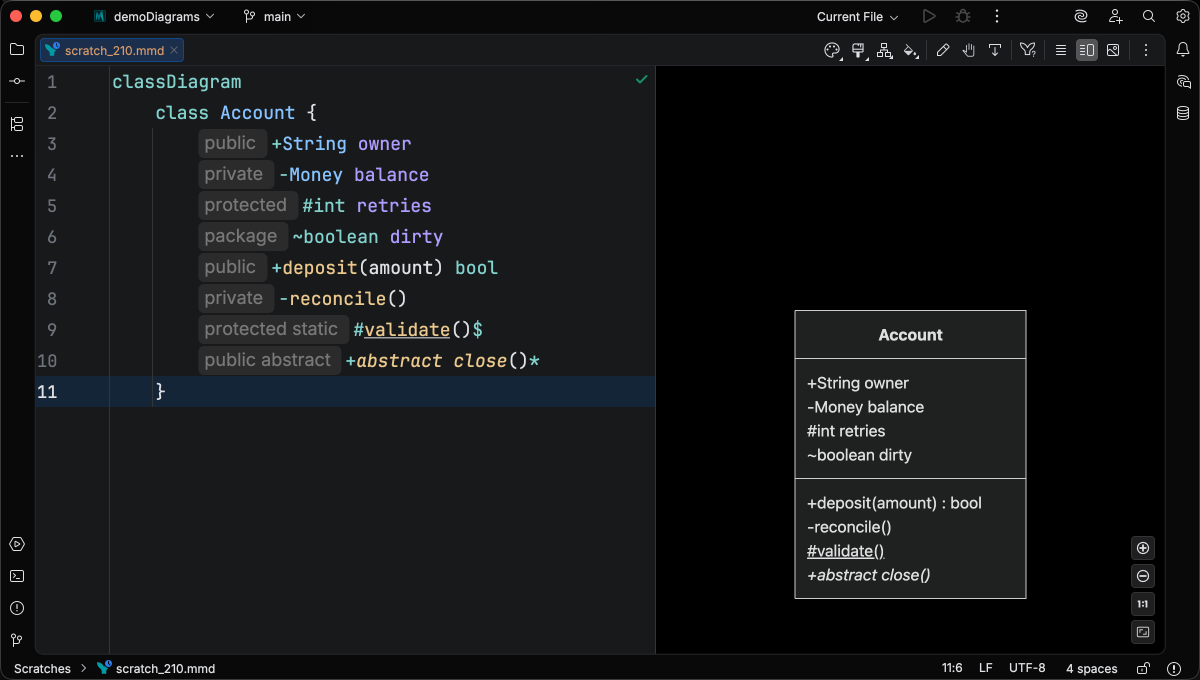
Section titled “Visibility and modifier inlay hints”Optional inlay hints spell out member visibility (+ / - / # / ~) and modifiers (*, $) as words at the start of each member line.
The hints are off by default; enable them under Settings > Editor > Inlay Hints > Mermaid Class Diagram.
Structure view
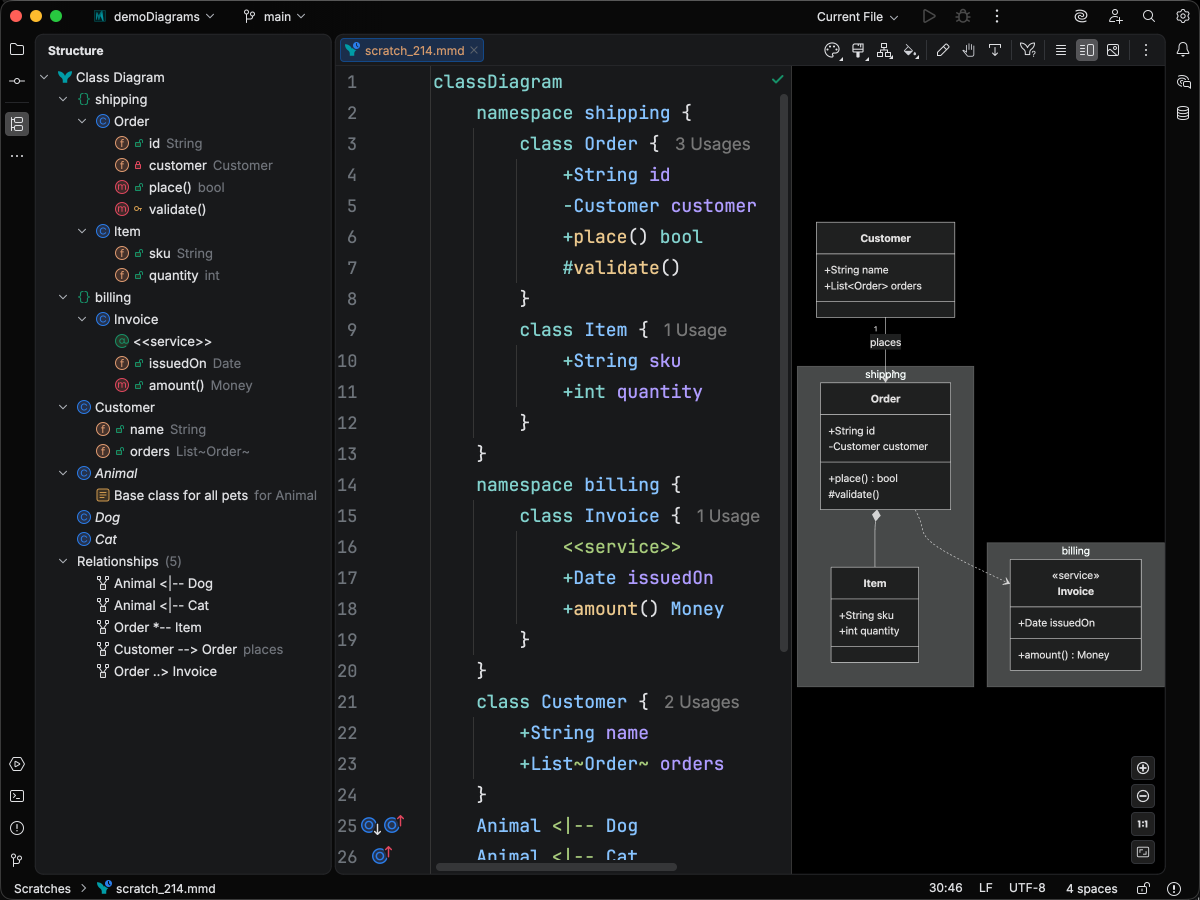
Section titled “Structure view”The Structure tool window now renders class diagrams as a tree of classes, namespaces, notes, styles, and relationships, with member-visibility badges and dedicated icons for each row type.
An optional Package toggle groups classes by their dotted-id prefix, so a diagram with com.billing.Invoice-style names reads like a Java package tree.
Gutter icons for inheritance and realization
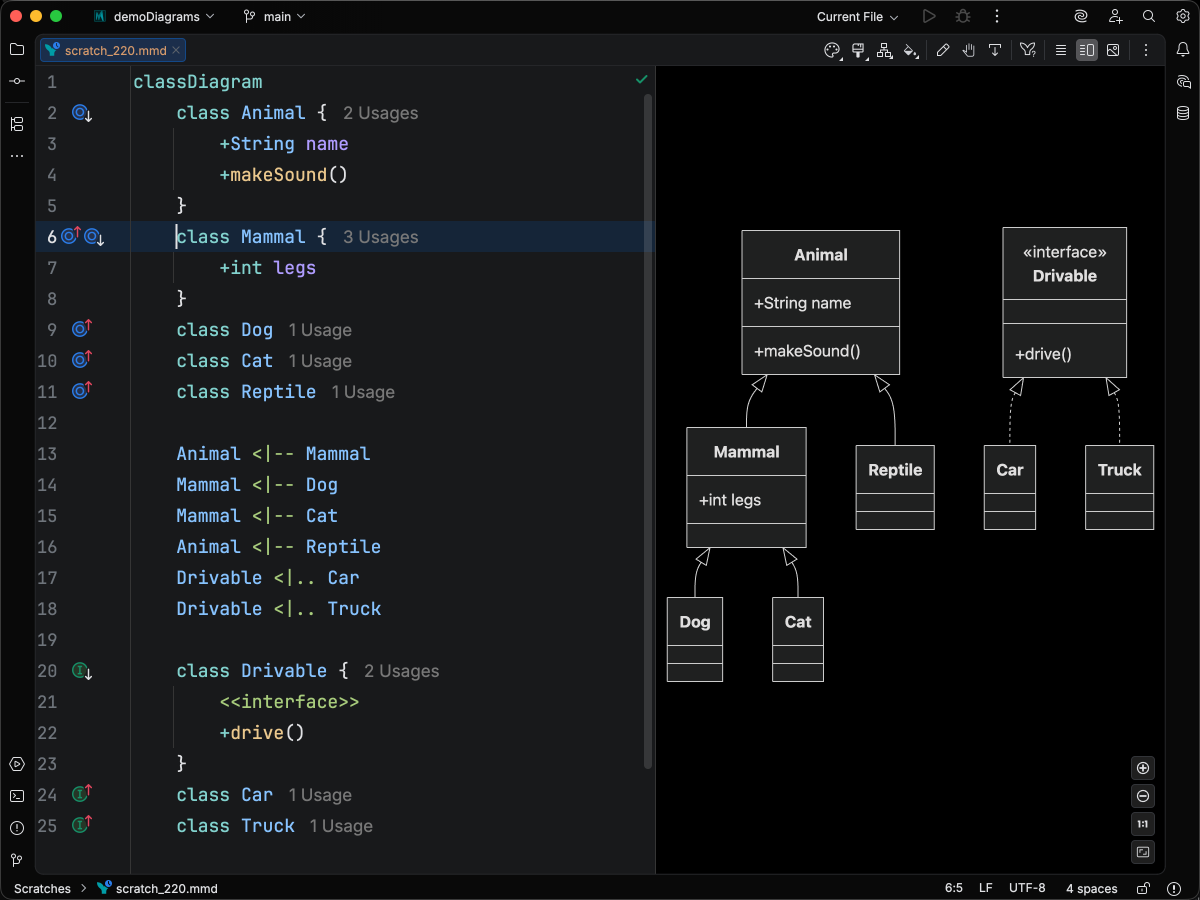
Section titled “Gutter icons for inheritance and realization”Inheritance and realization relationships now appear as gutter icons on the parent and subclass/implementer declarations. Click an icon to jump straight between the related classes.
Live templates
Section titled “Live templates”A new set of live templates scaffolds class declarations, annotations, namespaces, notes, and relationships.
Type a short abbreviation (clsi for an interface, cls for a plain class, relreal for realization, relinh for inheritance, nfc for a note for ..., etc.) and the template surfaces in completion.
Relationship templates use class-name completion for both endpoints, so building a hierarchy never requires retyping a class id.
Smarter completions
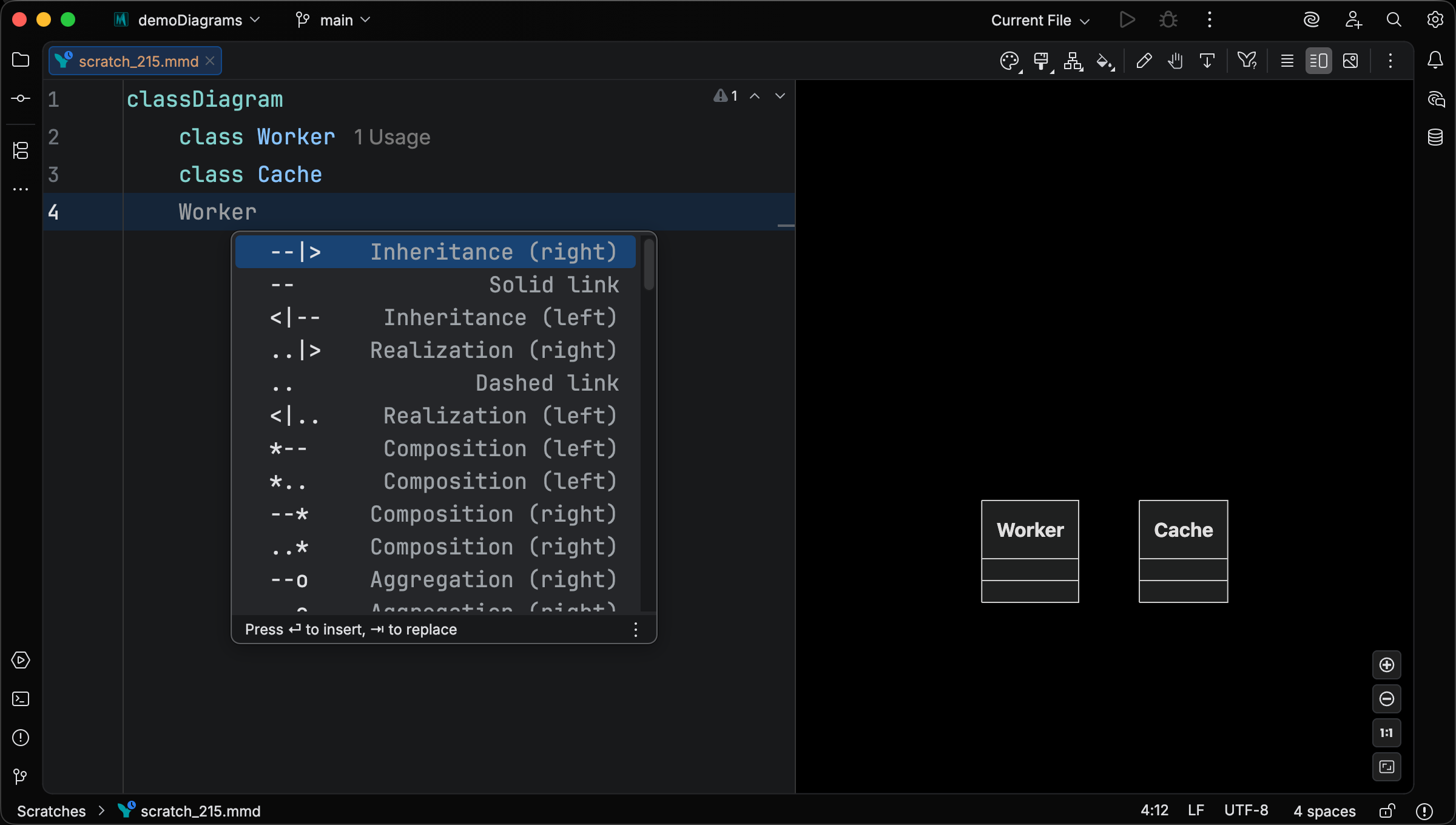
Section titled “Smarter completions”Relationship operator completion now offers every combination of arrowheads and line styles, including bidirectional forms like <|--|>, <-->, and o--o, and asymmetric mixes like <|-->.
Type a partial operator and the popup filters by prefix.
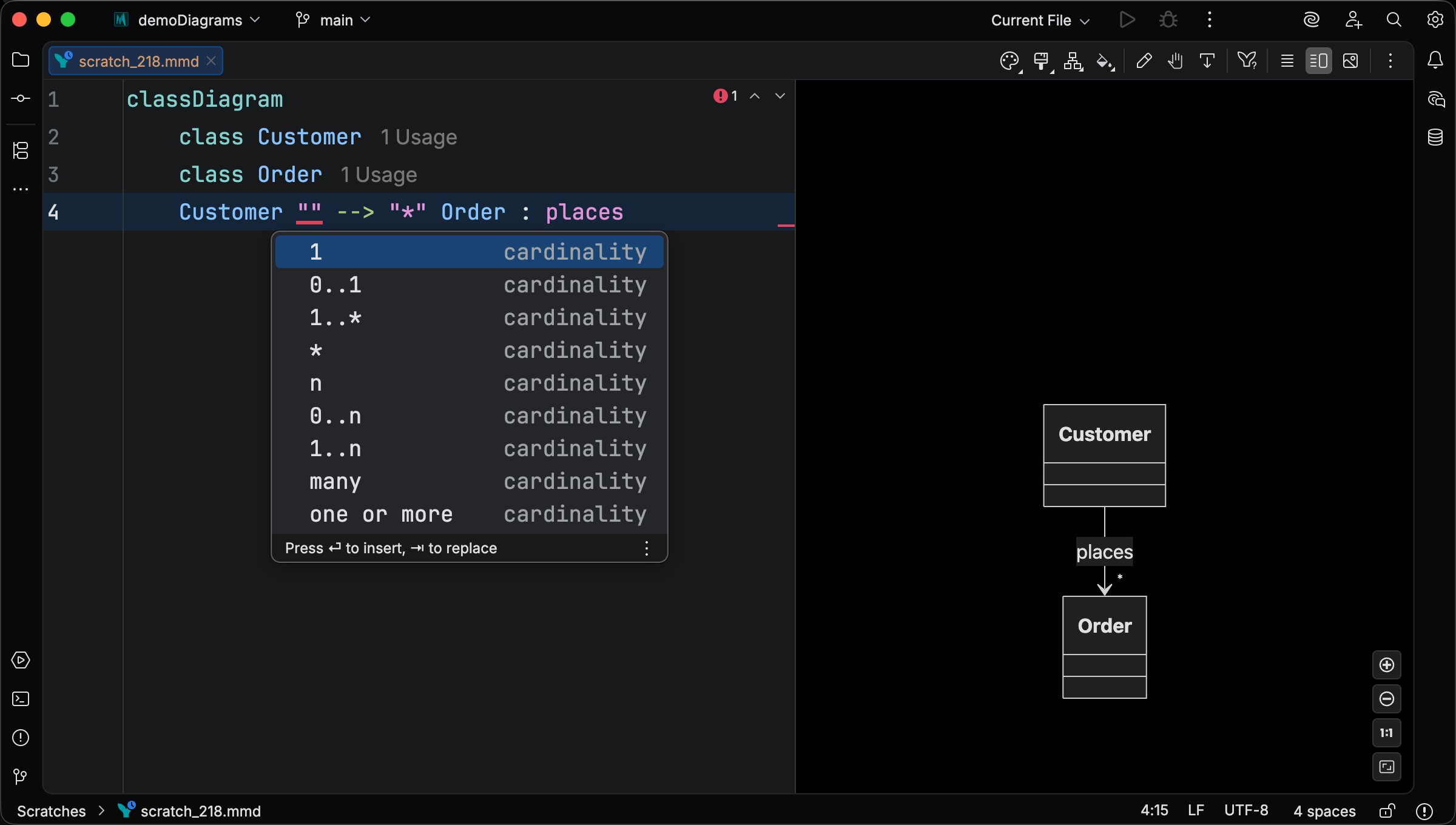
Cardinality slots offer presets like 1, 0..1, 1..*, *, n, many, and one or more; free-form text still works, since completion is a convenience rather than a constraint.
Click, link, and callback statements also get context-appropriate completions for href / call, link-target keywords, and the full upstream tooltip and call-arg grammar.
Quick fixes and intentions
Section titled “Quick fixes and intentions”Two new code intentions land for class diagrams:
- Add class declaration — for any class that’s referenced but never declared (in a relationship, style/cssClass target, click/link/callback, or note), creates a declaration in the right place.
- Merge class declarations — when a class is declared more than once across the file, consolidates every declaration into the one under the caret.
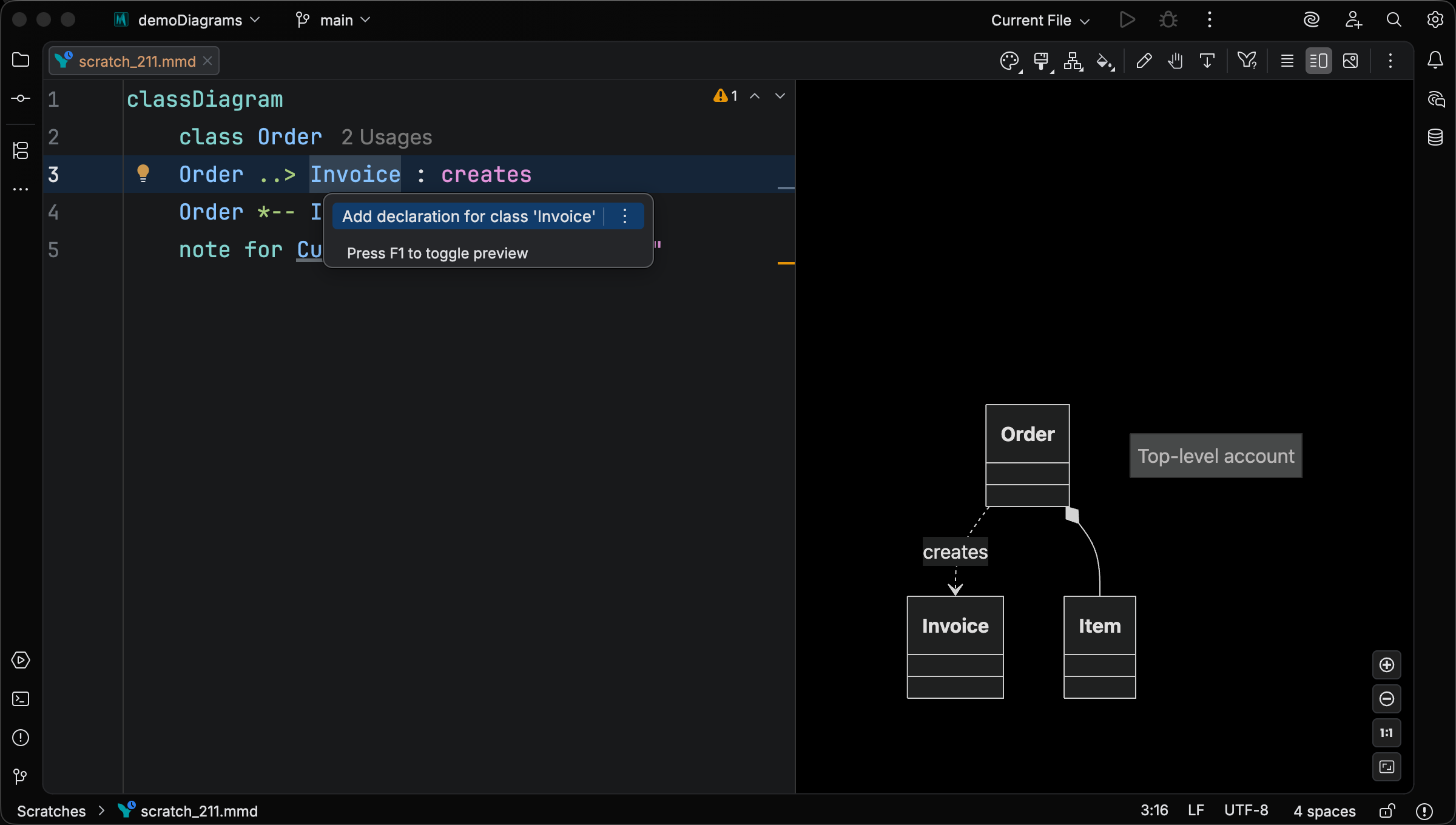
A separate inspection now warns when a style or cssClass statement targets a class declared later in the file, with a quick fix to move the statement after its target.
New syntax forms recognized
Section titled “New syntax forms recognized”- Standalone class annotations —
<<interface>> ClassNameon its own line. - Inline class annotations —
class ClassName <<interface>>andclass Foo <<interface>> { ... }(Mermaid 11.14.0+). - Notes inside namespace bodies —
note "..."andnote for X "..."are now valid insidenamespace { ... }(Mermaid 11.13.0+). - Bidirectional and asymmetric relationships —
<|--|>,<-->,o--o,<|-->, etc.
Each form is version-gated: the grammar always accepts it (so editor features stay on while you experiment), but if the configured runtime predates the form, you get a clear error explaining the minimum required Mermaid version.
Flat-id reference resolution
Section titled “Flat-id reference resolution”Class reference resolution now matches upstream Mermaid’s flat-id semantics: dots in class names are literal characters, namespace association comes solely from enclosing namespace { ... } blocks, and references resolve by exact text.
Dotted identifiers in style statements are now a parse error, matching upstream.
Three previously-shipped namespace-qualified-reference inspections were removed (the underlying problems no longer exist), and the duplicate-class inspection was renamed to Class declaration namespace conflict with a tighter rule.
Cross-cutting changes
Section titled “Cross-cutting changes”Enter brace expansion in every edition
Section titled “Enter brace expansion in every edition”Pressing { } now expands to a multi-line block in every brace-using diagram type, in all editions (Free, Core, Studio).
The closing brace lands at the parent line’s indent and respects your code-style indent options.
Default formatter indent flipped to 1
Section titled “Default formatter indent flipped to 1”Default base indent is now 1 across Sequence, Class Diagram, Gantt, Timeline, Requirement, XY Chart, Architecture, Flowchart, Block, C4, Git Graph, Mindmap, Ishikawa, and ER. Content sits one level below the diagram-type keyword by default, matching upstream Mermaid layout. If you preferred the old flush-left output, the indent is configurable per diagram type under Settings > Editor > Code Style > Mermaid.
After upgrading, reformatting will indent existing diagrams by one level.
Use Reformat Code (
Preview zoom shortcuts
Section titled “Preview zoom shortcuts”The preview’s pan/zoom keyboard handler now requires the platform-native modifier (Cmd on macOS, Ctrl elsewhere) for + / - zoom in/out.
Plain +, -, 0, and 1 no longer trigger zoom, so they don’t compete with typing during inline edits.
Cmd/Ctrl+wheel zoom is also OS-aware now (was previously either modifier on any platform).
Arrow-key pan is unchanged.
Preview fixes
Section titled “Preview fixes”- Smooth trackpad pan on Linux and Windows — diagonal two-finger pan no longer lags behind the gesture
- No more edit-time render flicker — the visible diagram is no longer torn down at the start of every render
- Auto live preview background fixed — inconsistent
Autobehavior when setting the live preview background has been resolved - Selection follows undo/redo — undoing back through edits keeps no longer results in a stale selection in the live editor
Changelog
Section titled “Changelog”- Class diagram navigation, find-usages, and rename now reach class identifiers in generic positions (
List~Foo~,Map~K, V~, multi-wordMy Pair), with rename preserving any trailing~T~suffix - Class diagram inline documentation: hover and quick-doc popups for classes, namespaces, classDef styles, statement keywords, UML relationship arrows, and stereotype annotations, with clickable type and class-name links
- Class diagram visibility and member-modifier inlay hints (opt-in, default off) that spell sigils like
+,-,*,$out as words - Class diagram structure view with a tree-style class / namespace / note / style / relationship hierarchy, member visibility badges, and an optional Package toggle that groups classes by their dotted-id prefix
- Class diagram persistent element selection in edit mode (lays the foundation for upcoming class diagram Element Style pane and live editor actions)
- Class diagram inspection that flags a bare class identifier on its own line as unused
- Class diagram intention to merge every declaration of a class into the one under the caret
- Class diagram support for an inline annotation + body on a class declaration (
class Foo <<interface>> { ... }, Mermaid 11.14.0+) - Class diagram future-syntax warning for
namespace Foo ["Display Name"] { ... } - Additional class diagram contextual completions
- Class diagram type highlighting now distinguishes built-in types from primitives, gives declared classes precedence over the type vocabulary, and resolves generic parameters against the owning class
- Class diagram highlighting now spans free-form member lines that don’t match the structured grammar
- Class diagram lollipop interface labels are now first-class class references for navigation, gutter icons, and intention placement
- “Add class declaration” intention for implicitly-referenced classes in class diagrams, and matching quick fix behavior for unresolved classes in style/cssClass statements
- Class-diagram inspection that warns when a
styleorcssClassstatement targets a class declared later in the file, with a quick fix to move the statement to the end - Class-diagram completions for class references (in relationships, style/cssClass targets, click/link/callback/note statements, and at statement start for new relationships or inline member declarations), CSS property names in
classDefandstyleproperty lists, and CSS class names in thecssClassstatement name position - Class-diagram support for standalone class annotation statements (
<<interface>> ClassName) and, on Mermaid 11.14.0+, inline class annotations (class ClassName <<interface>>), with an inspection that flags unresolved or forward-referenced classes in annotation statements and a version-gated error for the inline form on older runtimes notesupport inside class-diagram namespace bodies, with a version-gated error when the runtime is older than Mermaid 11.13.0- Class-diagram rename validator that accepts dotted and backtick-quoted identifiers where Mermaid permits them
- Class-diagram gutter icons for inheritance and realization relationships, with click-through navigation between parent and subclass/implementer declarations
- Class-diagram contextual live templates for class declarations, annotations, namespaces, notes, and relationships
- Preview Fit (Cmd/Ctrl+0) and Actual Size (Cmd/Ctrl+Shift+0) keyboard shortcuts that work from either the source editor or preview pane, with shortcut hints shown in the preview toolbar tooltips
- Localized live-preview and markdown-preview UI strings (zoom toolbar tooltips, empty-diagram placeholder, copy/show-source/popout actions) into German, Japanese, Korean, and Chinese
Changed
Section titled “Changed”- Default formatter base indent flipped to 1 across Sequence, Class Diagram, Gantt, Timeline, Requirement, XY Chart, Architecture, Flowchart, Block, C4, Git Graph, Mindmap, Ishikawa, and ER, so content sits one level below the diagram-type keyword by default. Configurable per diagram type under Code Style.
- Class diagram highlighting palette refresh: relationship labels render as strings, annotation delimiters and inner text share one color,
:::styles as an operator, and visibility/abstract/static modifiers share the keyword color - Class diagram empty-namespace check moved from a hard error to a user-disable-able inspection; note-only namespaces are no longer flagged
- Class diagram CSS dash-name error now fires only when the offending property is the first in the list, matching upstream’s actual parse-failure behavior
- Replaced the generic property icon with a dedicated metadata icon (gray lowercase
m) fortitle,accTitle,accDescr, anddirectionentries in structure view and navbar - Class-diagram class-name completions now use annotation-derived icons (interface, abstract, enum, service) matching the structure view, instead of a generic node icon
- Trimmed redundant keyword prefixes and kind hints from structure-view rows across flowchart, requirement, venn, block, and architecture
- Class-diagram class reference resolution now matches upstream Mermaid’s flat-id semantics: dots in class names are literal characters, namespace association comes solely from enclosing
namespace { ... }blocks, and references resolve by exact text. Dotted identifiers instylestatements are now a parse error. The three namespace-qualified-reference inspections were removed and the duplicate-class inspection was renamed toClass declaration namespace conflictwith a new rule (see Added). - Class-diagram keyword recognition is now case-sensitive, matching upstream Mermaid: capitalized variants like
Class,Note,Stylelex as identifiers, so multi-word names likeclass Class Name {}parse normally. The contrast in syntax-highlight color (lowercase keyword vs. identifier) tells the typo-vs-intentional story at a glance. - Class-diagram
directionis recognized at parse time rather than via a lexer keyword, so a class can be nameddirection(also as the leading word of a multi-word name likeclass direction Foo) without backtick quoting.direction <value>still parses as a direction statement when the value isTB/BT/LR/RL; otherwise it falls through to a dangling-class-ref or a multi-word identifier, matching upstream’s “the entire line is a direction statement only when the pattern is present” semantics. - Class-diagram stray
;outside a class body is now flagged as a parse error, matching upstream’s lexical error. - Improved class-diagram syntax guide
- Class-diagram attribute/method name-conflict inspection demoted to a weak warning, off by default
- Improved “enter inside braces” support for diagram types that already implement brace matching
- Preview zoom in/out keys now require the platform-native modifier (Cmd on macOS, Ctrl elsewhere) to avoid interfering with typing during inline edits
Removed
Section titled “Removed”- Cardinality validation inspection in class diagrams (replaced by the new cardinality completion presets)
- “Add CSS class name” intention in class diagrams
- Preview: smooth trackpad and mouse momentum pan on Linux and Windows
- Preview: eliminated edit-time render flicker; the visible diagram is no longer torn down at the start of every render
- Preview: fixed AUTO theme background inconsistency
- Preview: selection now follows undo/redo
- Preview: edit-mode tooltip now points to the correct documentation URL
- Class diagram: relationship label terminates at
;, matching upstream - Class diagram: a stray token at file-level no longer abandons the rest of the file
- Class diagram: parse errors inside a class or namespace body no longer propagate to sibling statements
- Class diagram: unrecognized member declarations now keep their highlighting instead of falling through as parse errors
- Class diagram: stray
;outside a class body is now flagged as a parse error, matching upstream - Class diagram: trailing content on the same line as a class or namespace body’s closing
}is now flagged as a parse error - Requirement diagram: empty
requirementandelementbodies no longer grow a blank line on every reformat - ER diagram:
accDescr { ... }blocks now reformat idempotently; accessibility nodes also preserve their source order in the structure view - Hover highlight clears when inline edit opens in the preview, instead of lingering behind the textarea