
What's new in Mermaid Studio 2026.2.1?
Last updated:
This is a major feature release that introduces Mermaid Studio Core, a new free edition of Mermaid Studio.
This release also introduces a visual flowchart editor, a style pane, reworked preview controls, and localization in four languages.
Highlights
Section titled “Highlights”Mermaid Studio Core
Section titled “Mermaid Studio Core”Mermaid Studio is now available as two plugins: Mermaid Studio Core (free with optional paid license) and Mermaid Studio (paid). Both support all 24 diagram types. Core is the recommended starting point for new users.
- Free — Syntax highlighting, basic validation, live preview, export, and Markdown integration for all 24 diagram types
- Core license — Adds code intelligence (completions, inspections, formatting, refactoring, structure view) for Flowchart, Sequence, Class, State, ER, and Block diagrams. Also includes MCP tools, edit mode, style pane, diagram sync, print dialog, and custom icon set import.
- Studio license — Everything in Core, with code intelligence expanded to all supported diagram types
Compare editions or see Pricing.
Live Flowchart Editor
Section titled “Live Flowchart Editor”Build and edit flowcharts visually. Add nodes from the shape picker, drag to connect, move elements between subgraphs, edit labels inline, and group selections into subgraphs with
Style Pane
Section titled “Style Pane”Select any element in the preview to open its style properties. Change shapes, fill/stroke colors, icons, images, link animations, and click actions without writing CSS. The style pane also works in Markdown code fences, styling the element under the editor caret. See Style Pane documentation for details.
Reworked Preview Controls
Section titled “Reworked Preview Controls”Pan and zoom have been rebuilt from the ground up for smoother, more responsive interaction. See Live Preview documentation for the full controls reference.
- Zoom with scroll wheel,
Command Command Control Ctrl +scroll for focal zoom, and toolbar buttons - Pan with middle-click drag or the new pan mode toggle
- Layout, Theme, Look, and Background toolbar menus with per-editor overrides
- Trackpad pinch-to-zoom and two-finger panning on macOS
Localization
Section titled “Localization”All UI strings, inspections, and intentions are now available in German, Simplified Chinese, Japanese, and Korean. The plugin language is configured independently of the IDE locale under Settings > Tools > Mermaid > Language. See Localization settings for configuration details.
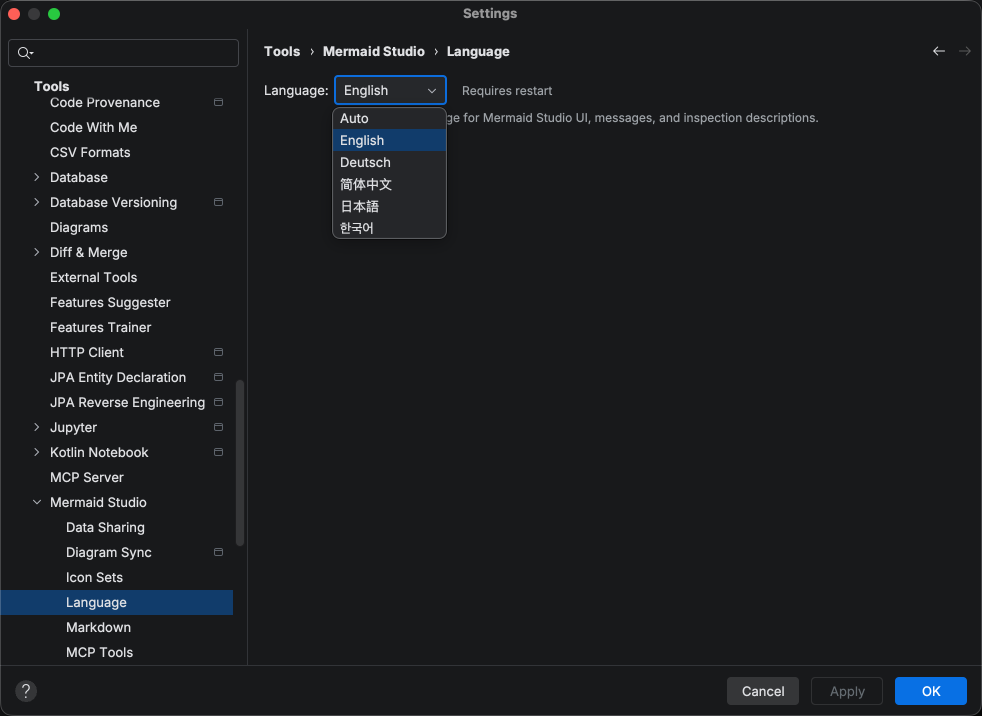
Translations are AI-generated using Claude Opus 4.6, not native translations. Translation coverage includes all IDE-side UI: inspections, intentions, settings, and tool window text. Some areas rendered inside the embedded browser (preview overlays, shape picker labels) are not yet translated.
Changelog
Section titled “Changelog”- Added live editor for Flowchart diagrams with inline label editing, node/edge creation and deletion, drag-and-drop node movement, edge retargeting, multi-selection, and undo/redo forwarding to the source editor
- Added style pane for Flowchart diagrams with shape/icon/image mode selector, link animation properties, click statement editing, and preview-driven activation from element selection
- Reworked live preview pan/zoom controls: wheel to pan,
Command Command Control Ctrl +wheel to zoom, middle-click drag to pan, pan mode toggle for left-click panning, Fit-Content and reworked 1:1 Actual Size buttons - Added Layout toolbar action for switching diagram layout engine (e.g., ELK, dagre) per diagram type
- Added Theme and Look toolbar menus with an Auto option that follows the IDE theme
- Added Background toolbar menu with color presets, dot grid toggle, and per-editor setting with global default
- Added localization support with German, Simplified Chinese, Japanese, and Korean translations for all UI strings, inspections, intentions, and inspection descriptions
- Added configurable plugin language setting under Settings > Tools > Mermaid > Language, independent of the IDE locale
- Added wider invisible overlay hit areas on diagram edges, making
Command + click Commandclick Control + click Ctrlclick navigation much easier to target - Added error inspection for Architecture Diagram group self-references (e.g.,
group api in api) - Added error inspection for Block Diagram column values that must be greater than 0
- Added error inspection for GitGraph merges where either branch has no commits
- Added error inspection for State Diagram composite states with multiple descriptions
- Added support for the Flowchart
anchorshape (invisible junction point,@{ shape: anchor })
Changed
Section titled “Changed”- Changed the default operator color to inherit from Metadata instead of Operation Sign, giving multi-character Mermaid operators (arrows, links, relationship markers) a more distinct color from basic variables
- Reclassified
:and@tokens from operator to punctuation across all diagram types, and consolidated per-language bracket/brace/paren keys into a single punctuation text attribute inheriting from Mermaid > Punctuation - Redesigned error banner in live preview and Markdown preview with rounded borders, proper margins, and IntelliJ error dialog icon
- Fixed ELK and tidy-tree layout plugins not loading in the live preview, generator, and Markdown preview
- Fixed Flowchart
linkStyleindex validation to only count links declared before the statement, preventing false positives when links appear after thelinkStyle - Fixed external images in Flowchart image shapes (
imgproperty) being blocked by Content Security Policy - Fixed preview cursor not reflecting the browser cursor (grab, pointer, etc.) in the IDE
- Fixed icon picker sometimes not selecting an icon on the first click
- Fixed Flowchart formatter inserting an extra blank line on each format pass for empty subgraphs
- Fixed protocol-less Mermaid click URLs (e.g.,
google.com) navigating to a 404 page inside the preview panel