
Localization
Last updated:
Mermaid Studio’s user interface, inspection messages, and intention descriptions are available in multiple languages. The plugin defaults to English and non-English translations are opt-in, since they are AI-generated rather than native translations. The plugin language can be configured independently of the IDE language, so you can run IntelliJ in English while using Mermaid Studio in German, for example.
Supported Languages
Section titled “Supported Languages”| Language | Code | Translation Source |
|---|---|---|
| English | en | Native (source) |
| Deutsch (German) | de | AI-generated (Claude Opus 4.6) |
| 简体中文 (Simplified Chinese) | zh | AI-generated (Claude Opus 4.6) |
| 日本語 (Japanese) | ja | AI-generated (Claude Opus 4.6) |
| 한국어 (Korean) | ko | AI-generated (Claude Opus 4.6) |
Changing the Language
Section titled “Changing the Language”- Open Settings > Tools > Mermaid Studio > Language
- Select a language from the dropdown
- Click OK or Apply
- Restart the IDE when prompted
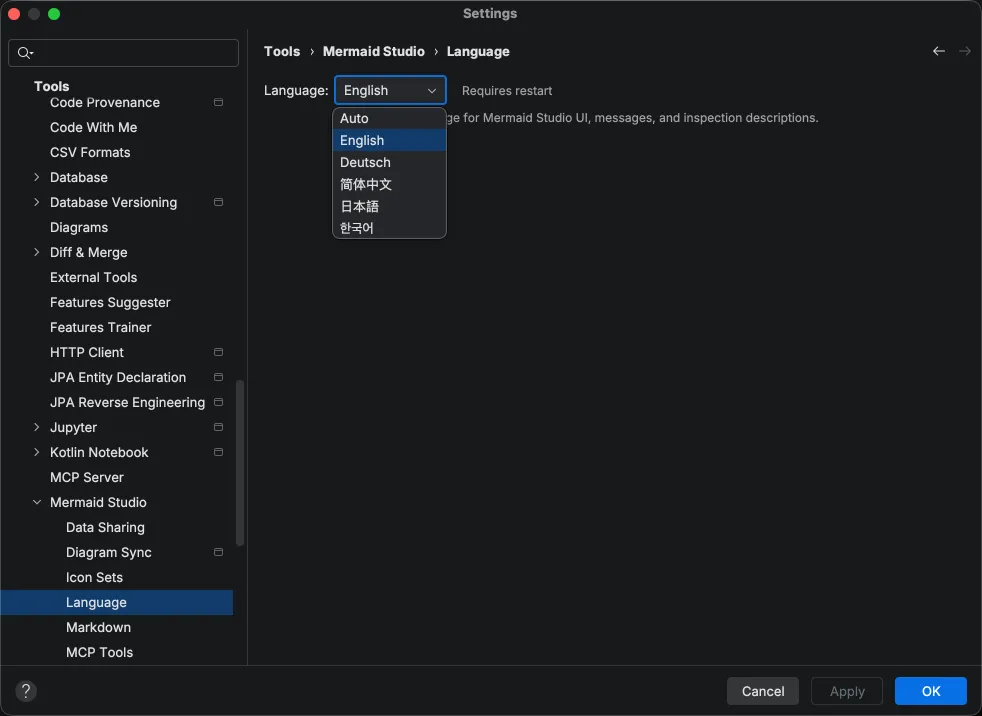
The default is English. The Auto option matches the plugin language to your IDE’s configured language. If the IDE is using a language that Mermaid Studio does not support, English is used as the fallback.
What Gets Translated
Section titled “What Gets Translated”The language setting controls all Mermaid Studio-specific UI text:
- Inspection and annotator messages (warnings, errors, and quick fix descriptions)
- Inline documentation
- Inspection descriptions in the settings panel
- Intention action names and descriptions
- Settings labels and dialog text
- Tool window labels and status messages
- Action names and menu items
- Dialog text
- Live preview and Markdown preview UI
About the Translations
Section titled “About the Translations”Non-English translations were generated by Claude Opus 4.6 (Anthropic’s most capable model at time of translation) and are not native translations. We chose AI-assisted translation to provide broad language coverage that would not have been feasible otherwise, but this means the translations may occasionally contain awkward phrasing, overly literal renderings, or subtle inaccuracies.
Translated strings are reviewed for semantic drift using back-translation, where each string is independently translated back into English and compared against the original to catch meaning changes and incorrectly translated technical terms.
Reporting Translation Issues
Section titled “Reporting Translation Issues”If you encounter a translation that is incorrect, misleading, or awkward, please submit a bug report. Select Localization from the Subsystem dropdown and include the language affected, the incorrect text (a screenshot works well), and a suggested correction if you have one.