
What's new in Mermaid Studio 2026.2.5?
Released:
This release supports Mermaid.js 11.15.0 and adds Event Modeling as the 27th supported diagram type. On top of that, it ships a class diagram editor upgrade, a state diagram language upgrade, and a long list of improvements and bug fixes.
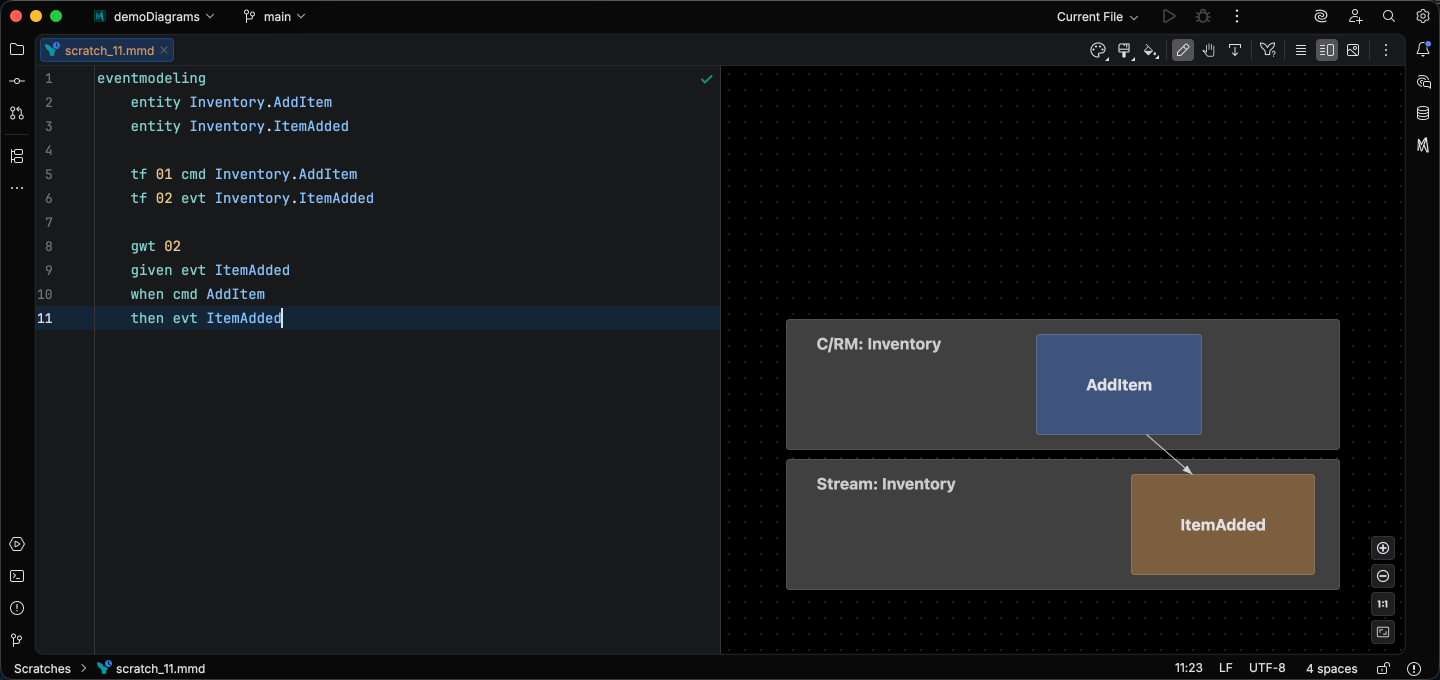
Event Modeling lands with semantic syntax highlighting plus some additional features including formatting, brace matching, and rename/refactor for data blocks.
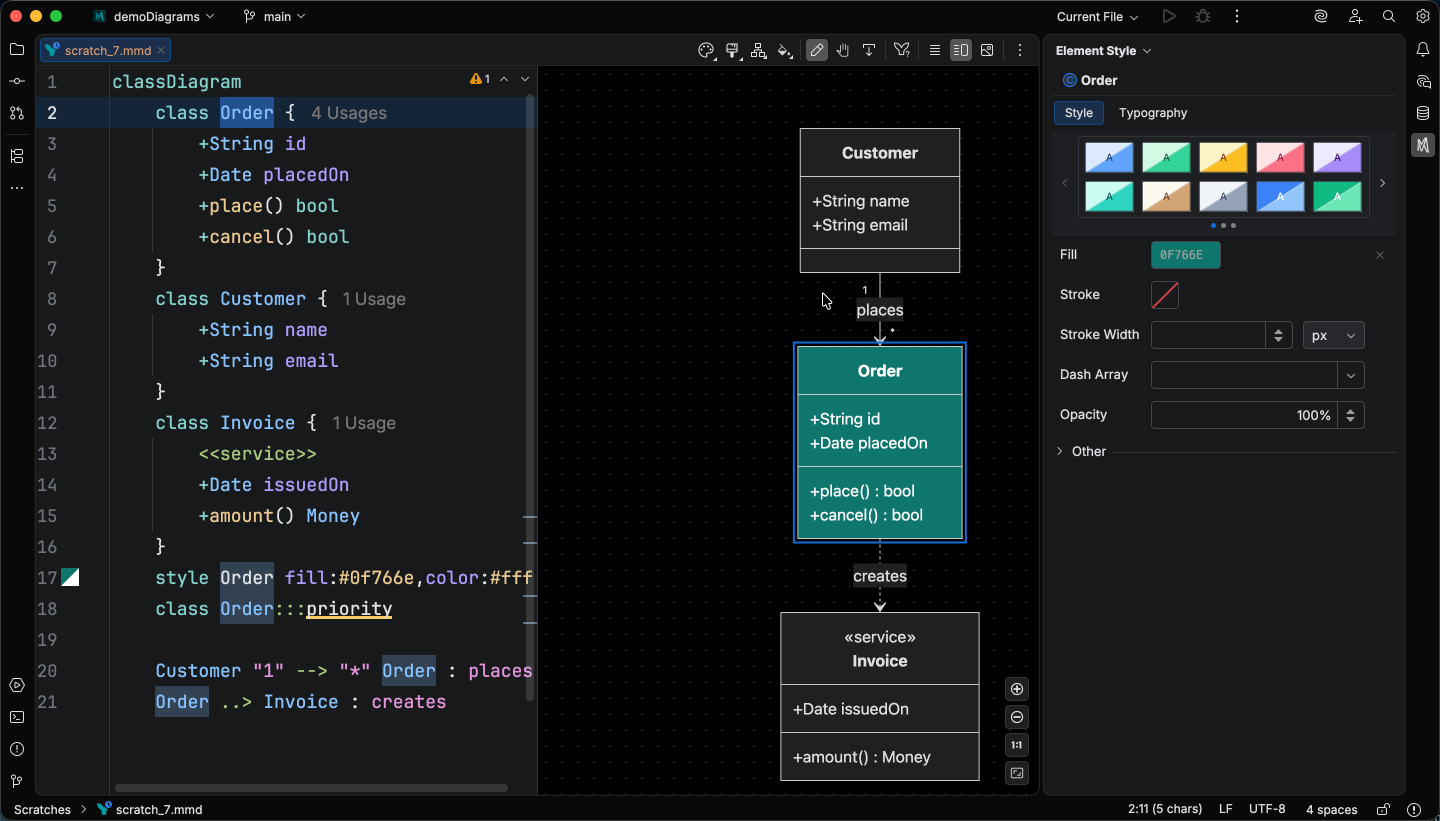
Class diagrams get the release’s biggest editing upgrade: the Element Style pane now drives a class’s full visual shape (colors, relationship arrowheads, line style, and cardinality), and you can rename elements right from the visual editor. Relationship labels, notes, and namespace titles rename inline, while classes rename through a class editor dialog that also changes annotations. State diagrams gain a code formatter and distinct, configurable color keys for every part of the grammar. Live templates expand to sequence, requirement, and state diagrams, joining the class-diagram set from 2026.2.4.
Outside the language work, Mermaid fences inside Markdown now reformat in place when you reformat the host file, image artifacts (.mmd.svg / .mmd.png) get a gutter icon that jumps to their source .mmd, and the preview, export, and sync surfaces stay disabled in untrusted projects so an unvetted diagram source cannot trigger network requests on open.
Highlights
Section titled “Highlights”Mermaid.js 11.15.0 is the new default
Section titled “Mermaid.js 11.15.0 is the new default”Mermaid Studio bundles the Mermaid.js library (the renderer that produces every diagram in the preview), and the bundled version is now 11.15.0.
Previously bundled versions remain available under Settings > Tools > Mermaid Studio > Mermaid Runtime for diagrams pinned to an older release.
Open .mmd files reparse automatically when you switch the bundled version, so version-gated highlighting and inspections update in place without needing a file close-reopen.
New language features in Mermaid.js 11.15.0 that the plugin now recognizes and version-gates against older bundled releases:
- Flowchart
datastoreshape (withdata-storealias) under the Technical shape category. - Block diagram thick-edge arrows render natively on 11.15.0; older versions get a warning annotation.
- Class diagram nested namespaces (
namespace Outer { namespace Inner { ... } }) parse and render alongside the existing dot-notation form, and thenamespace Foo ["Display Label"]classLabel syntax is supported. - Sequence diagram decimal autonumber (
autonumber 1.1 0.1) is validated, with trailing-whitespace lint to match. - Quadrant chart unicode portability lint is silenced; Mermaid 11.15.0 handles unicode quadrant text natively, so the portability warning is no longer needed.
The frontmatter JSON schema adds the new 11.15.0 config keys: architecture.{nodeSeparation, idealEdgeLengthMultiplier, edgeElasticity, numIter}, sankey.{labelStyle, nodeWidth, nodePadding, nodeColors}, and class.hierarchicalNamespaces.
Event Modeling diagrams (Mermaid.js 11.15.0+)
Section titled “Event Modeling diagrams (Mermaid.js 11.15.0+)”A new diagram type lands with the 11.15.0 runtime: Event Modeling, Mermaid’s notation for event-driven systems.
Initial support includes syntax highlighting, code folding, a code formatter, brace matching, and rename refactoring for data block names.
Class diagram visual editing
Section titled “Class diagram visual editing”Class diagrams are now editable straight from the preview, the way flowcharts have been. The Element style pane covers them as a first-class diagram type: select a class and apply a style preset or set custom CSS property values.
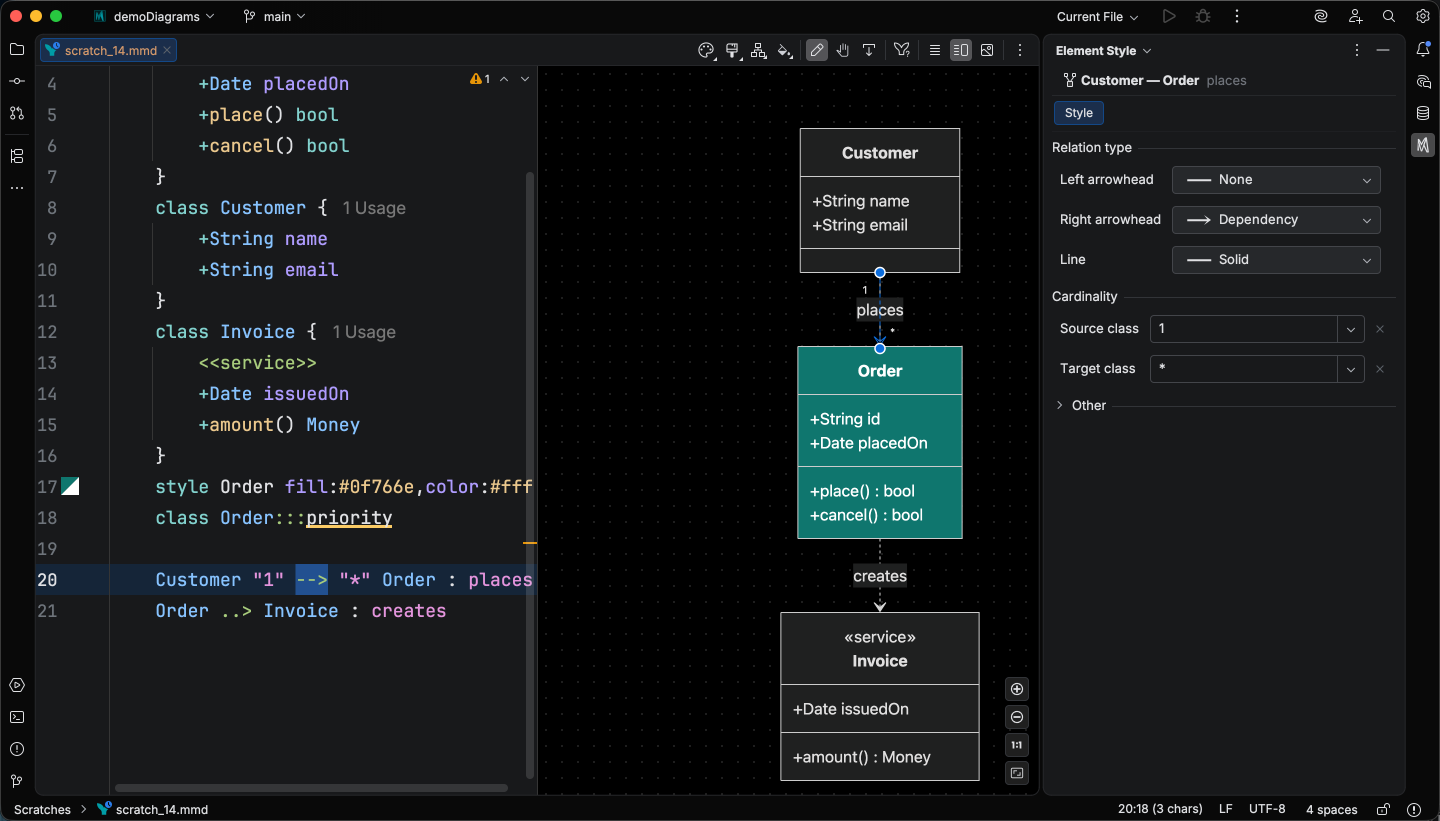
Select a relationship to set its arrowheads, line style, and the cardinality on either end.
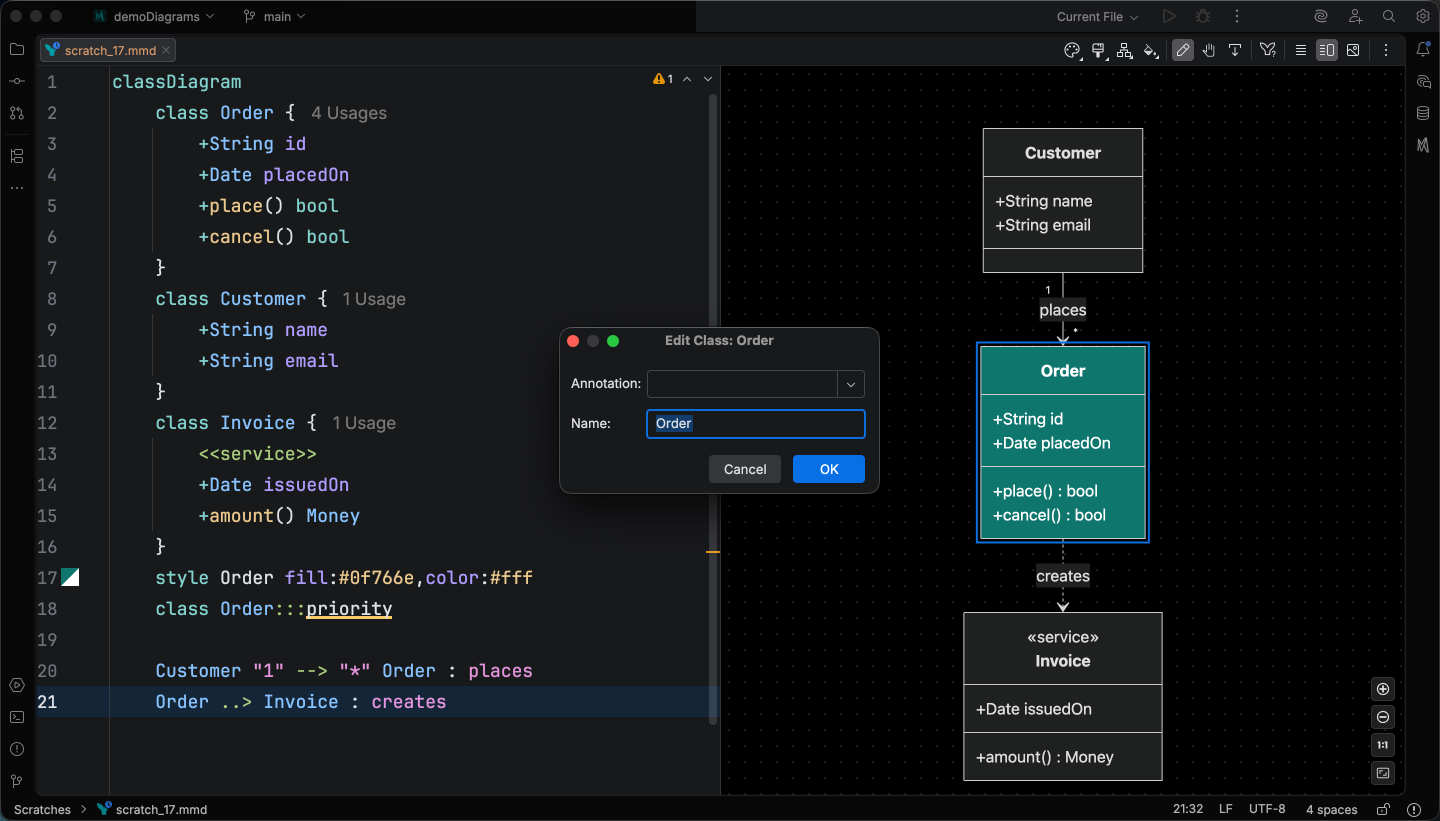
You can also rename elements without editing the source.
Relationship labels, notes, and namespace titles rename inline in the preview, with namespace edits auto-wrapping values in backticks when needed so their markup isn’t corrupted.
Classes rename through a class editor dialog that also changes the annotation (<<interface>>, <<abstract>>, <<enum>>, etc.).
Routing class renames through the dialog rather than an inline overlay keeps class identifiers containing HTML or Markdown intact, and member indentation stays consistent across annotation changes.
Live templates land for three more diagram types
Section titled “Live templates land for three more diagram types”Three new sets of context-aware live templates ship this release, joining the class-diagram set from 2026.2.4. The new Live Templates page covers the cross-cutting mechanics (triggering, contextual visibility, configuration); each diagram-type page below lists its full abbreviation reference.
- Sequence diagram — 31 templates covering block wrappers (
loop,alt,opt,par,critical,break,rect,box), notes, participants and actors (including the typed-metadata@{type: ...}form), messages with an arrow-picker macro for the operator, andautonumber. - Requirement diagram — 15 templates: the six requirement variants, element blocks, and the seven relationship verbs (
satisfies,traces,contains,derives,refines,copies,verifies) plus a generic verb-picker. - State diagram — 13 templates: state declarations (aliased, composite, choice, fork, join), transitions (plain, labeled, start, end), and positioned notes (left / right, single- and multi-line).
Configuration for the bundled templates also moves this release: a dedicated Settings > Tools > Mermaid Studio > Live Templates page now holds per-template enable / disable toggles and a single Show live templates in completion popup toggle for the whole bundle. See Configuring templates.
State diagram formatter and highlighting
Section titled “State diagram formatter and highlighting”State diagram syntax highlighting now matches the depth of the most fully-supported diagram types: distinct color keys for arrows, concurrent dividers, transition labels, hex colors, CSS properties, literal CSS values, and direction values, all tunable from a dedicated color settings page under Settings > Editor > Color Scheme > Mermaid State Diagram.
A code formatter lands at the same time, with composite-body indentation and statement-level whitespace normalization. The base indent is configurable under Settings > Editor > Code Style > Mermaid > State Diagram.
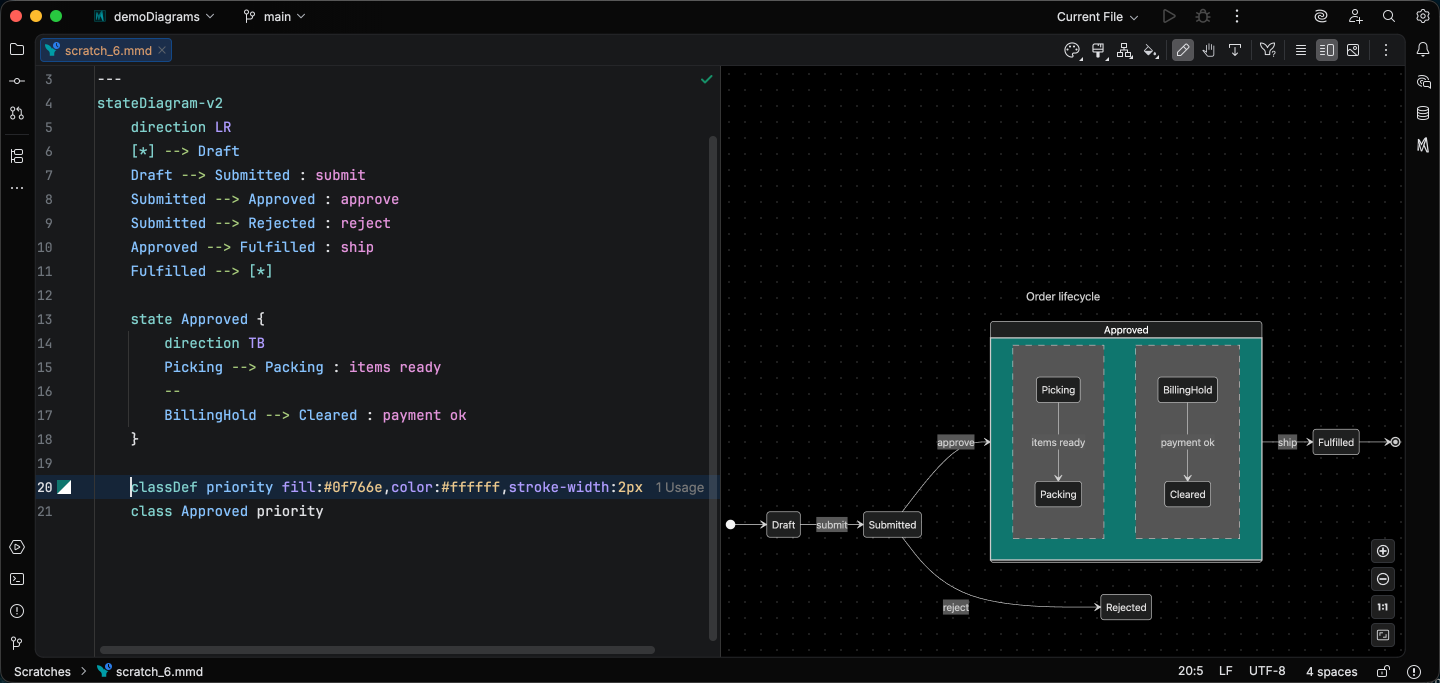
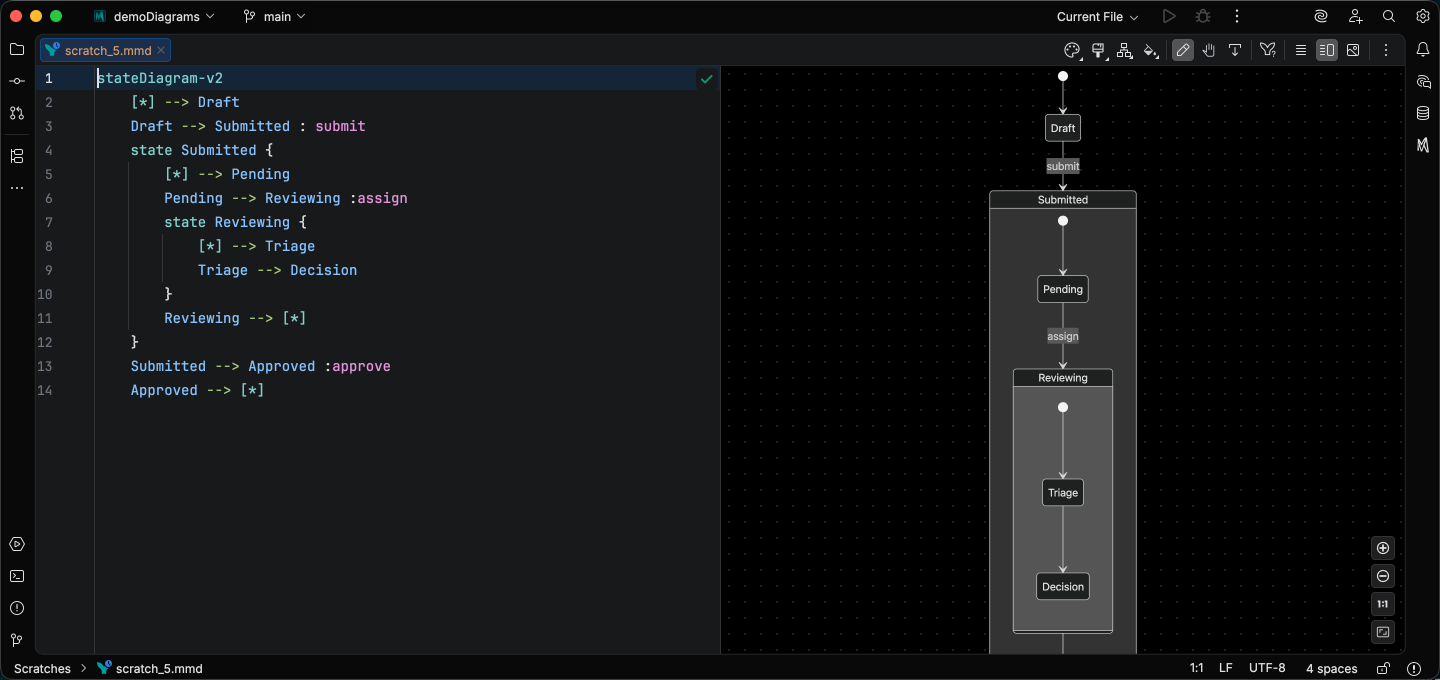
Composite bodies now lazy-parse, so a parse error inside one composite state no longer cascades to its siblings or the rest of the file.
Click statements parse in both upstream forms (click ID "url" "tooltip" and click ID href "url"), including on [*] edge states, and comma-separated class A,B,C styleName targets split into distinct references so every state resolves correctly.
Markdown integration upgrade
Section titled “Markdown integration upgrade”Mermaid diagrams embedded in Markdown ```mermaid fences now reformat in place when you run Reformat Code on the host file, including fences nested under list items and fences with YAML frontmatter.
Image artifacts left next to your .mmd source (.mmd.svg / .mmd.png) now show a gutter icon and a Go to Mermaid Source action that navigates back to the source .mmd / .mermaid file.
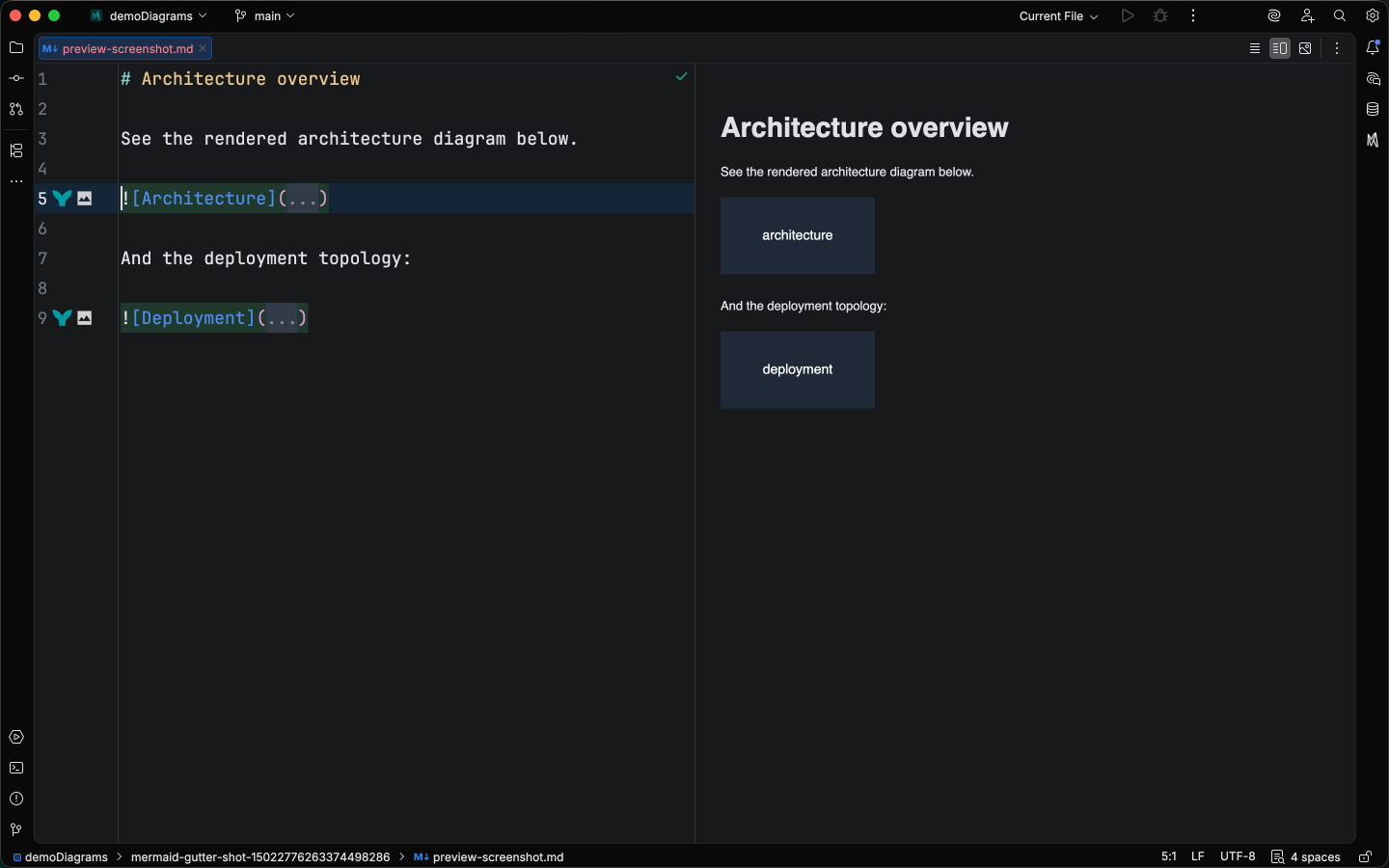
The Markdown preview hot-swaps Mermaid runtime config changes in place instead of closing and reopening every open Markdown editor, so saving preview settings no longer loses scroll position or tab focus. When Diagram Sync rewrites an embedded image on save, the preview refreshes that image instead of showing a stale browser-cached copy.
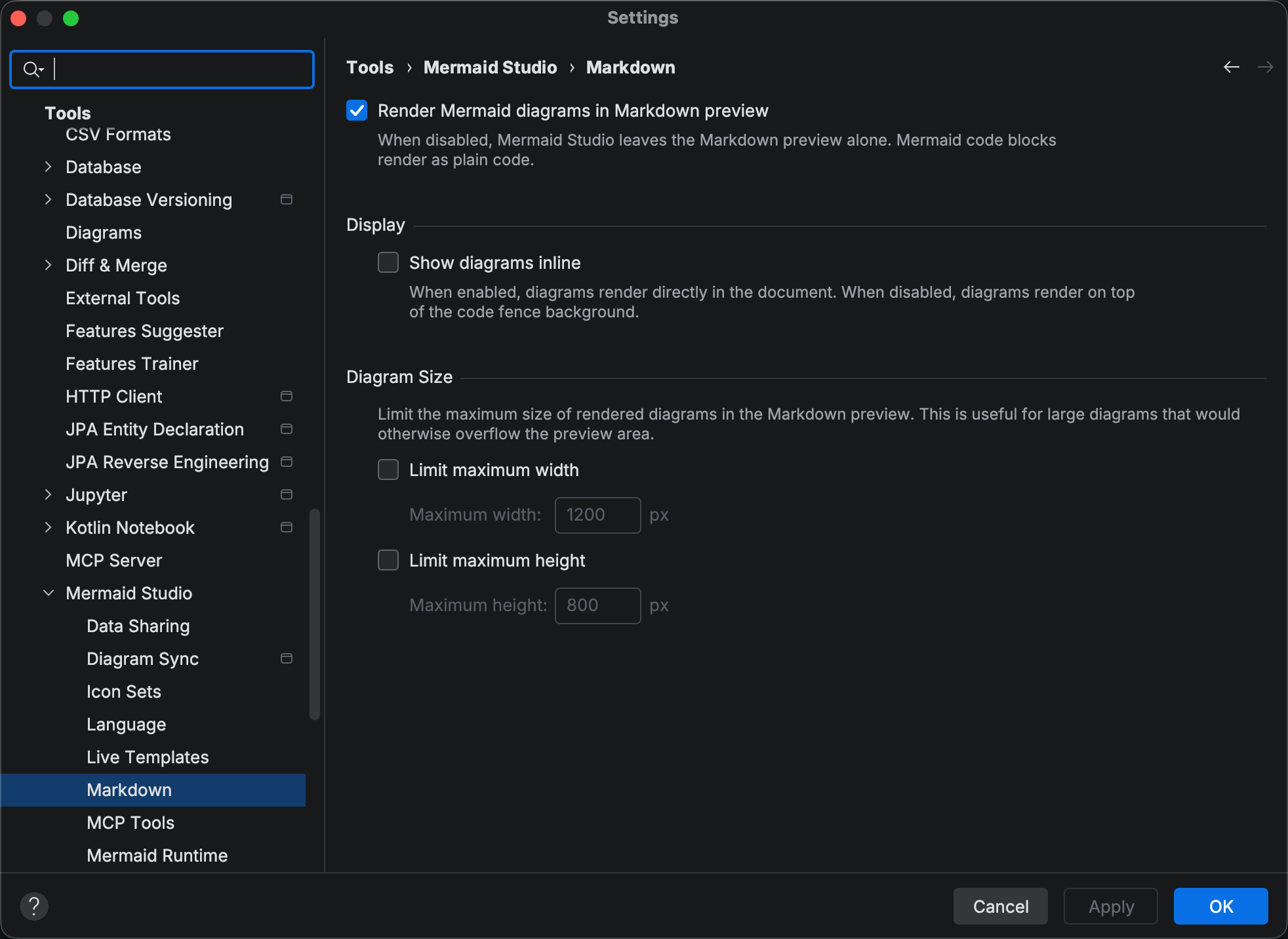
A new Markdown setting lets you disable Mermaid’s contributions to the platform Markdown preview entirely, leaving mermaid fences as plain code blocks.
Untrusted projects
Section titled “Untrusted projects”The live preview, popout, Markdown rendering, export / print / copy, and Diagram Sync now stay disabled in untrusted projects.
This brings Mermaid Studio in line with IntelliJ’s safe-mode contract: opening a project from an unknown source no longer renders embedded diagrams until you’ve reviewed it.
The safety win is that an unvetted diagram source cannot trigger external network requests (icon-set images, <img> tags inside HTML labels, embedded URLs) just because you opened the file in your IDE.
Editing surfaces (syntax highlighting, completion, inspections, refactoring, structure view) keep working, so you can read and audit source through the editor without committing to trust.
The preview re-activates automatically once you mark the project trusted, no IDE restart required.
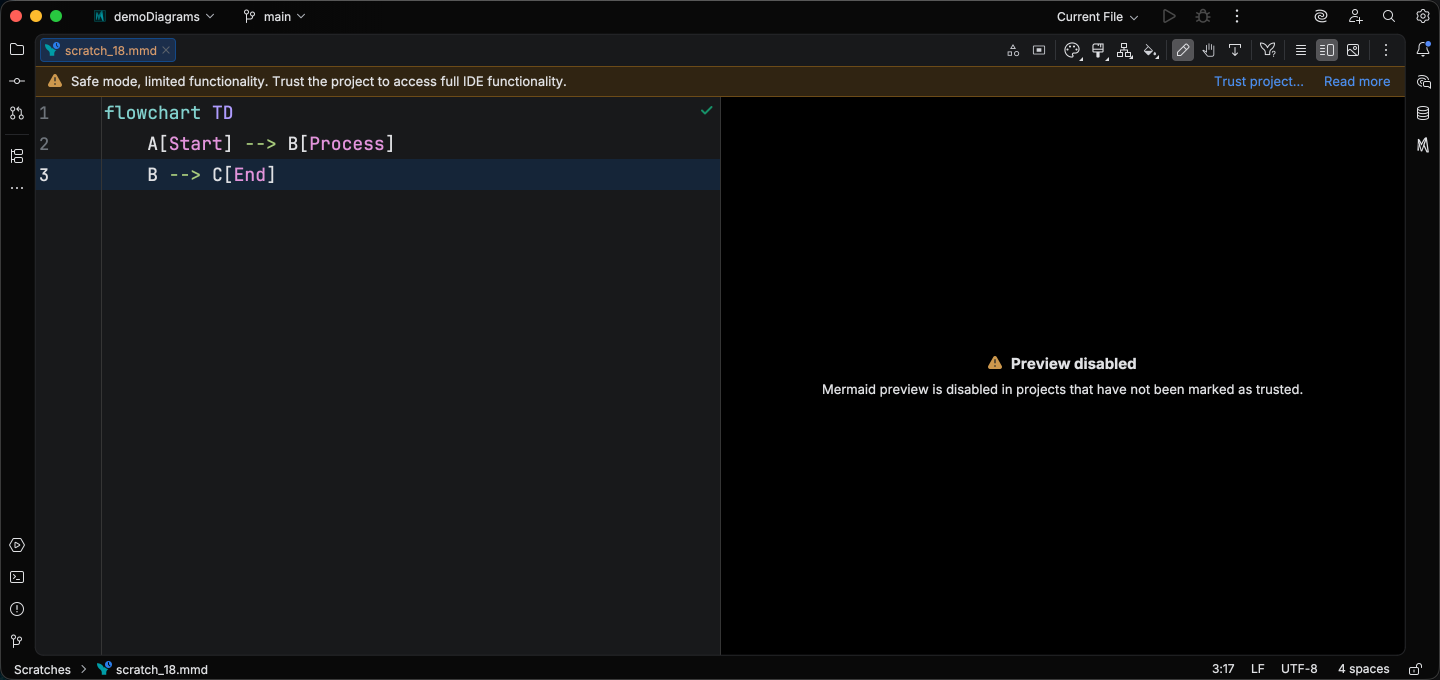
See Security for the full model, including the MCP-tools carve-out and the related Mermaid.js securityLevel config that governs HTML escaping in labels.
Tool window combo selector
Section titled “Tool window combo selector”The Mermaid Studio tool window’s Style / Icons mode selector is now a compact combo dropdown, and the id-label band that previously sat above the content is gone, freeing a row of vertical space for the active panel.
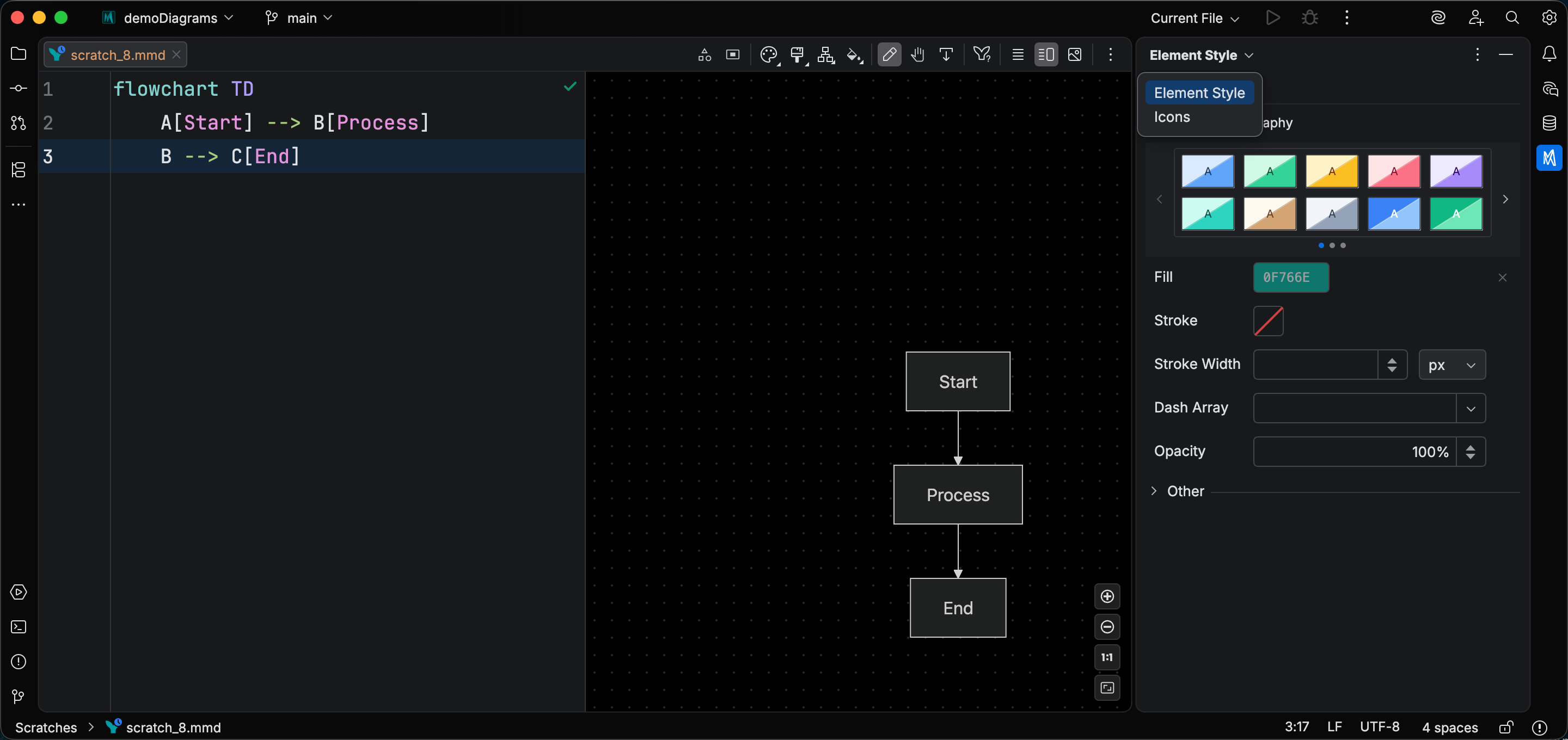
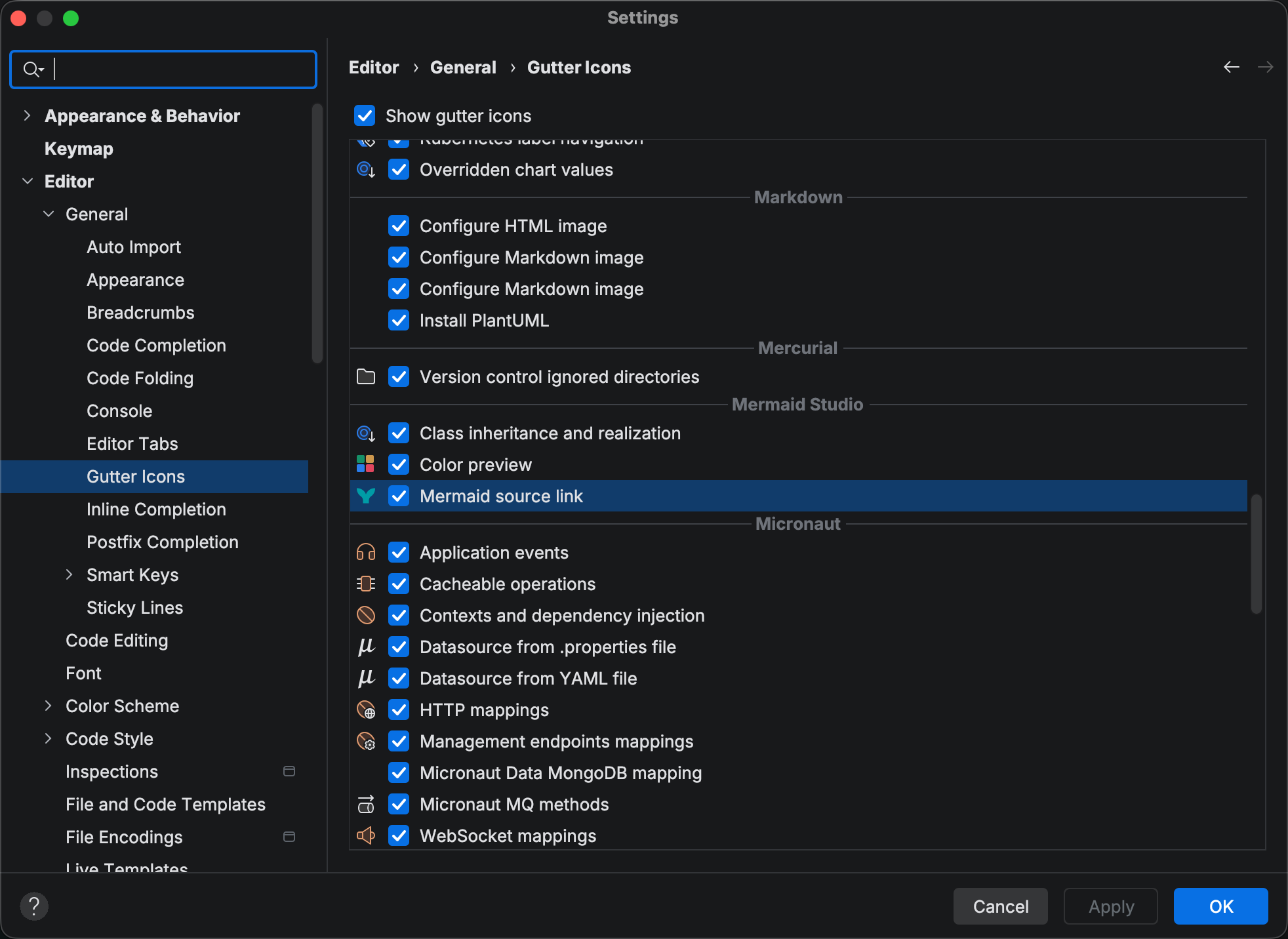
Toggleable gutter icons
Section titled “Toggleable gutter icons”Mermaid Studio’s gutter rows (color previews on hex literals, class-inheritance markers in class diagrams, and Markdown source links on image artifacts) are now toggleable under Settings > Editor > General > Gutter Icons.
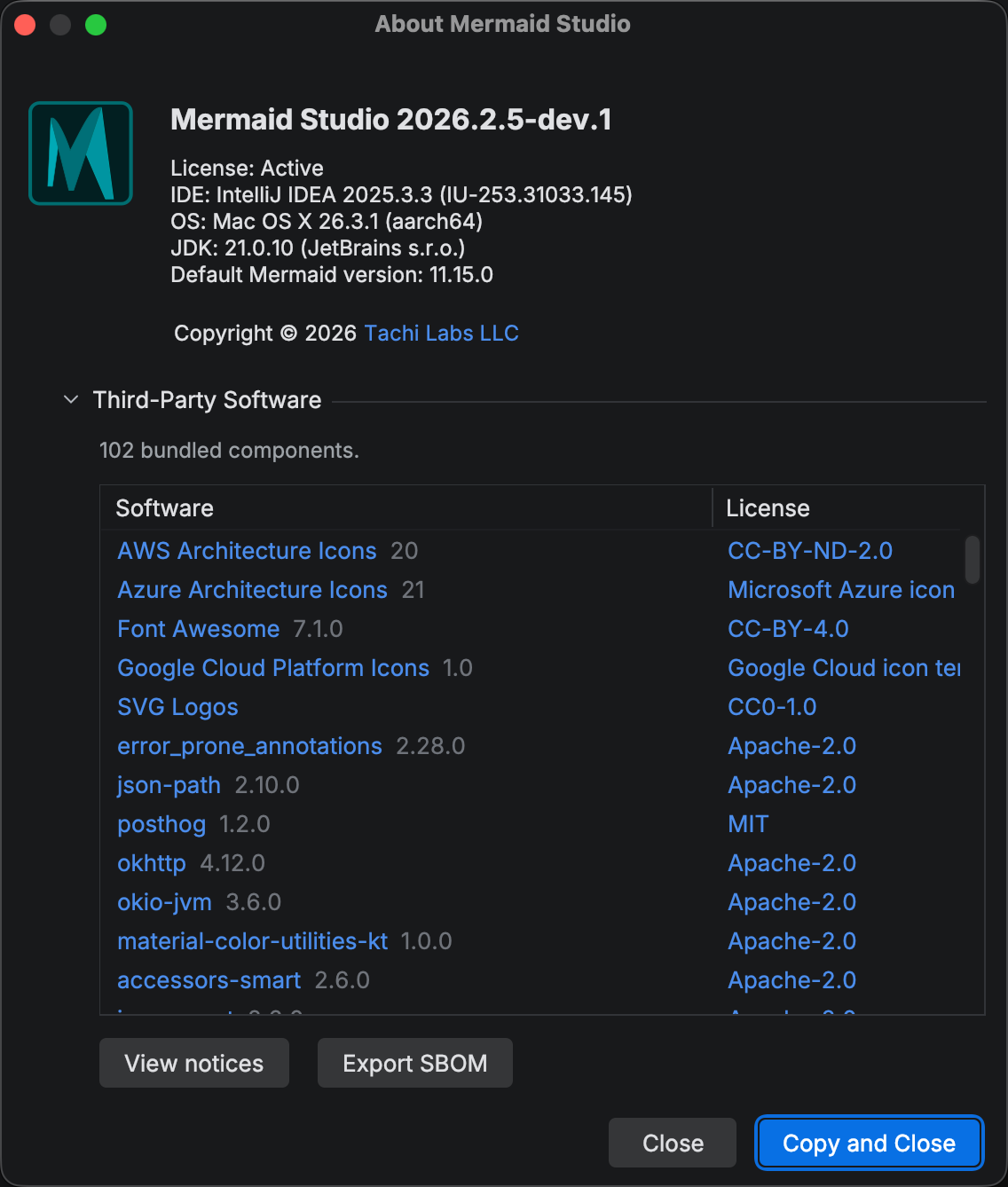
About Mermaid Studio
Section titled “About Mermaid Studio”A new Help > About Mermaid Studio dialog lists every bundled third-party component with its license and notices, and exports the CycloneDX software bill of materials (SBOM) with one click. Review the plugin’s open-source dependencies and their licenses in place, or export the SBOM to feed a license-compliance or supply-chain scan.
Cross-cutting changes
Section titled “Cross-cutting changes”Insert Sample Diagram shortcut on Windows and Linux
Section titled “Insert Sample Diagram shortcut on Windows and Linux”The default shortcut for Insert Sample Diagram is now Alt+Shift+S, which conflicted with the platform Save Context action.
The sample picker is now also available inside an empty Markdown ```mermaid fence, not only after a diagram-type keyword has been typed.
New Mermaid Scratch File search abbreviation
Section titled “New Mermaid Scratch File search abbreviation”Typing nmsf in Search Everywhere or Find Action now jumps straight to New Mermaid Scratch File.
Indent-aware line comments
Section titled “Indent-aware line comments”Comment with Line Comment (%% at each line’s existing indent rather than at column 0, so comment markers line up with the surrounding code.
Commenting a line inside a structural block used to push the marker out to column 0, breaking the block’s indentation:
flowchart TD subgraph Auth%% A --> B B --> C endNow the marker stays at the line’s indent, so the comment reads as part of the block:
flowchart TD subgraph Auth %% A --> B B --> C endSankey and Quadrant diagrams now also have a line commenter registered (they previously had none). Ishikawa comments indent to align with the following non-comment node instead of staying flush left.
Localized code-style labels
Section titled “Localized code-style labels”Code style settings labels are now translated into German, Japanese, Korean, and Chinese across every diagram type.
Selection stays put while you edit
Section titled “Selection stays put while you edit”Selecting an element in the preview now keeps that selection as you keep working on the diagram. Typing, switching focus between the editor and the preview, moving the caret off the element, reformatting, and applying a quick fix no longer drop the selection or reset the Element Style pane. Renaming the selected element carries the selection along, so the Element Style pane and the preview highlight stay on it; the selection clears only when you delete the element.
Changelog
Section titled “Changelog”- Basic Event Modeling diagram support (
eventmodeling): syntax highlighting, parsing, formatting, code folding, brace matching, and find usages and rename for data blocks - Support for Mermaid 11.15.0 as the new default renderer, with frontmatter completion and validation for the new architecture, Sankey, and class diagram config options it adds
- Class diagram basic visual editing for class and namespace identifiers as well as relationship labels
- Class diagram Element Style pane: style classes with a shared preset or custom colors, pick left and right arrowheads (inheritance, dependency, etc.) and a solid or dashed line, and set the cardinality on either side of a relationship; the header shows the same class-type icons as the structure view
- Class diagram code style options for colon spacing in relationships and inline member declarations
- State diagram code formatter
- Sequence diagram syntax highlighting for embedded JSON in
propertiesandlinksblocks - Sequence diagram warning, with a one-click fix, for a trailing space after a
@{...}participant attributes block - Sequence diagram warning for statements inside a
boxother than participant or actor declarations, which Mermaid won’t render - Bundled live templates for Sequence, State, and Requirement diagrams
- Settings page for the bundled live templates with per-template toggles
- Mermaid live template contexts (Frontmatter, Other) for attaching your own templates under Settings > Editor > Live Templates
- Gutter icon and “Go to Mermaid Source” action to jump from a generated
.mmd.svg/.mmd.pngimage back to its source diagram file - Markdown preview refreshes embedded Mermaid images when Diagram Sync rewrites them on save, instead of showing a cached copy
- Setting to leave
mermaidcode fences as plain code blocks in the Markdown preview - Mermaid preview, export, print, copy, and Diagram Sync are disabled in untrusted projects and re-enable automatically once the project is trusted
- Comment with Line Comment now works in Sankey and Quadrant diagrams
- Wardley Map completion and validation for
wardley.*theme variables (components, links, axes, grid, annotations) - New Mermaid Scratch File can now be triggered by typing
nmsfin Search Everywhere / Find Action - Help > About Mermaid Studio dialog listing bundled third-party components with their licenses and notices, plus one-click export of the CycloneDX software bill of materials (SBOM)
Changed
Section titled “Changed”- Mermaid Studio tool window groups tabs by default to improve readability
- Improved Sequence diagram keyword completion placement accuracy
- Requirement diagram relationship type completion no longer shows a leading icon
- Markdown Mermaid rendering now attaches to the platform preview panel instead of replacing it, so plugin updates no longer leave previews showing raw
mermaidcode blocks - Ishikawa comments now indent to align with the node below them instead of staying at column 0
- Improved State diagram syntax highlighting with distinct, configurable colors for arrows, concurrent dividers, transition labels, hex colors, CSS properties and values, and direction values
- Code style setting labels are now localized (German, Japanese, Korean, Chinese) across every diagram type
- Color preview, class inheritance, and Markdown source gutter icons can now be toggled under Settings > Editor > General > Gutter Icons
Removed
Section titled “Removed”- Class diagram “Namespace-qualified class reference in relationship” inspection that flagged valid dotted class names
- Class diagram no longer flags
class Innerinsidenamespace Outer.Inneras a cycle - Class diagram identifiers wrapped in backticks (
`Foo`) are treated as the same class as the bare form, so navigation, find usages, and rename work across both - Clicking the second of two parallel class-diagram relationships between the same two classes now selects the one you clicked
- Sequence diagram formatter no longer glues the first content line onto a titleless
boxorrectheader - Sequence diagram empty
box/loop/alt/rectno longer gains an extra blank line on each reformat - Sequence diagram parse errors inside one block no longer cascade into the rest of the file
- Sequence diagram
par_overblocks are now covered by the “participant declared inside control flow” inspection and its quick fix - Sequence diagram Enter inside inline
properties/linksJSON no longer triggers comma insertion or brace expansion - Sequence diagram now folds
boxandpar_overblocks - Sankey value-column numbers now render reliably after edits within a row
- Sankey node references now resolve to the first occurrence of a name, fixing Find Usages and Go to Declaration
- State diagram
clickstatement tooltips are now parsed correctly - State diagram comma-separated
class A,B,C styleNametargets now resolve each state individually - Element Style pane “remove value” (X) buttons now show the property’s name (e.g. “Remove Fill”) and appear only when there’s a value to remove
- Editor context-menu Mermaid action icons no longer fail to load in release builds
- Live preview now renders for users upgrading from 2026.1.x who had customized preview settings
- Saving a Mermaid runtime config change now updates open Markdown previews in place, preserving scroll position and tab focus
- Preview element selection is now stable: it persists through editor focus changes, caret movement, and unrelated edits; follows renames in both the Element Style pane and the preview; refreshes after formatter, quick-fix, and other non-typing edits; and applies to Mermaid embedded in Markdown code fences too
- Sample picker is now available inside an empty Markdown
mermaidcode fence, not only after a diagram-type keyword - Insert Sample Diagram shortcut is now
Alt+Shift+Don all keymaps (wasAlt+Shift+S, which conflicted with Save Context) - Comment with Line Comment now inserts
%%at each line’s existing indent instead of column 0 - Reformat Code now formats Mermaid diagrams inside Markdown
mermaidcode fences, including nested and frontmatter-bearing fences, resolving several diagram-specific formatter issues in that context