
What's new in Mermaid Studio 2026.3.1?
Released:
This release is a major rearchitecture of Mermaid Studio onto IntelliJ’s new modular “split mode” architecture, to support the growing segment of the community that uses IntelliJ in remote development environments. Each feature has been reworked for remote development. A small number of minor features are unavailable or limited there, such as the browser find action in the diagram previewer. As a result of this change, JetBrains IDE releases prior to 2025.3 are no longer supported in Mermaid Studio 2026.3 and above.
This release adds support for Mermaid.js 11.16.0, unlocks a wave of new syntax across existing diagram types, and introduces three new beta diagram types: Cynefin, Railroad, and Swimlane. It also reworks the appearance system, with more configurable automatic detection of the diagram theme and background and a new Appearance dropdown that manages diagram theme, look, and font in place of the separate theme and look dropdowns.
The color-picker gutter icons are now free for everyone instead of a paid feature, alongside a long list of editing, template, and inspection improvements.
Highlights
Section titled “Highlights”Three new diagram types
Section titled “Three new diagram types”Three beta diagram types arrive on the Mermaid.js 11.16.0 runtime with varying levels of support in this release.
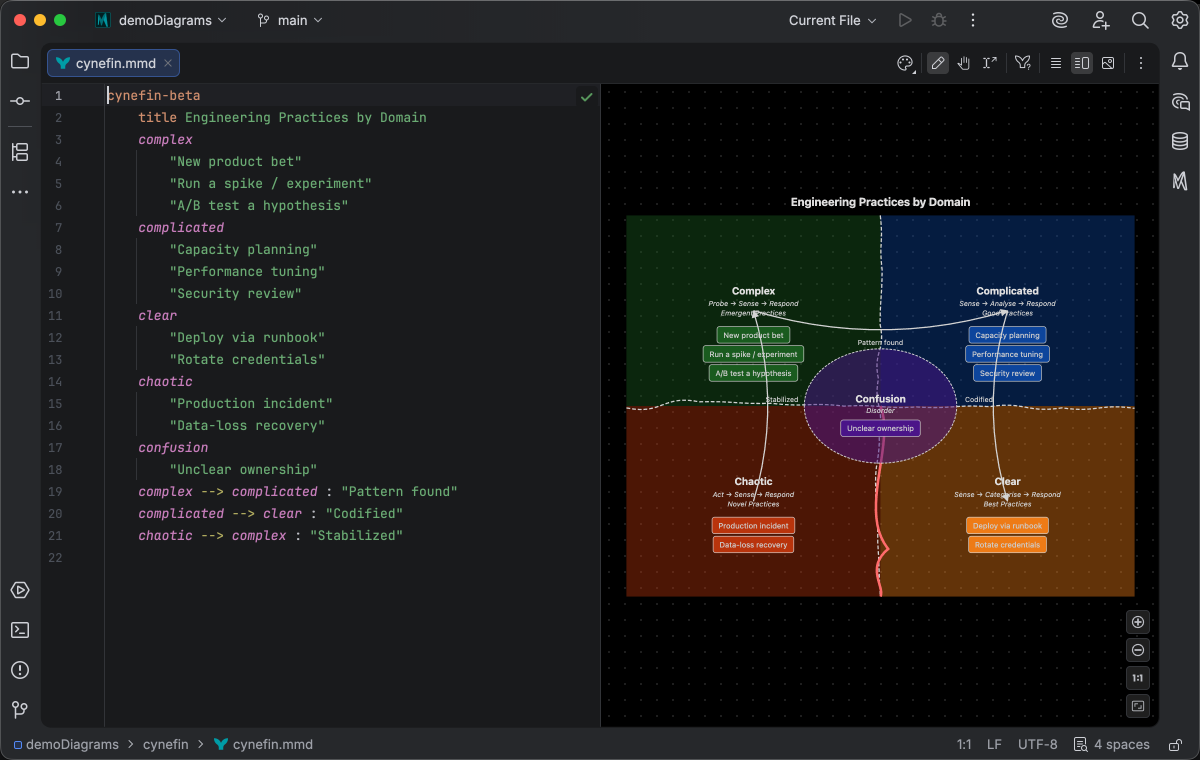
Cynefin (cynefin-beta) models the Cynefin decision-making framework, and ships with syntax highlighting, validation, completion, code folding, formatting, and spellchecking.
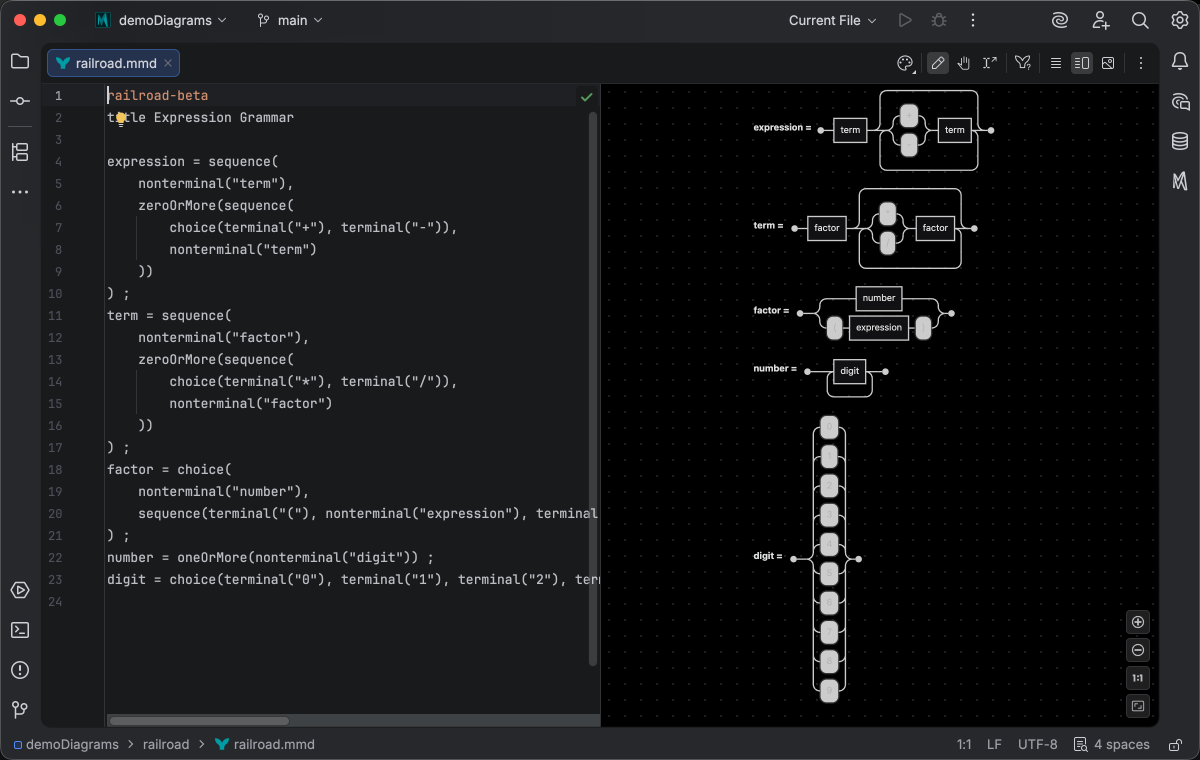
Railroad (railroad-beta) renders railroad diagrams, also called syntax diagrams, across the IR, EBNF, ABNF, and PEG notations.
Mermaid Studio detects railroad diagrams, renders them in the themed live preview, completes their frontmatter configuration, and links out to the syntax documentation. Semantic syntax highlighting and validation are not available yet and are on the roadmap for a future release.
Swimlane (swimlane-beta) carries the full Flowchart feature set, so everything you can do in a flowchart source works in a swimlane.
Full support for this diagram type is available to paid license holders on both the Mermaid Studio Core and Mermaid Studio plugins.
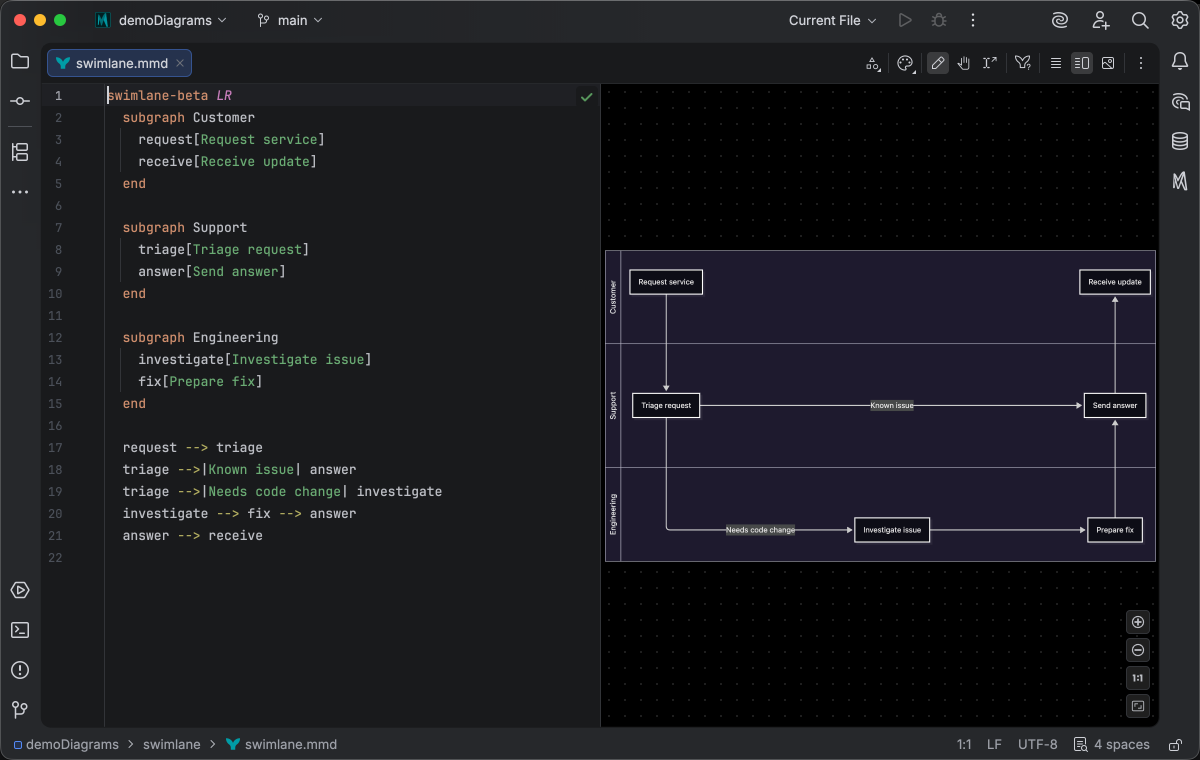
In the visual editing mode, you can drag a lane to reorder it and the source updates to match.
Because Swimlane is a beta diagram in Mermaid.js 11.16.0, its visual editing experience is mostly the same as Flowchart’s, aside from the drag-to-reorder gesture above. As the diagram type matures, that experience will likely be refined for Swimlane editing.
Mermaid.js 11.16.0 is the new default
Section titled “Mermaid.js 11.16.0 is the new default”Mermaid Studio bundles the Mermaid.js library that renders every diagram in the preview, and the bundled version is now 11.16.0. Previously bundled versions stay available under Mermaid Runtime for diagrams pinned to an older release. Syntax introduced in 11.16.0 is version-gated, so the plugin flags it with an error inspection on older runtimes where it would not render.
New language features in Mermaid.js 11.16.0 that the plugin now recognizes:
- ER diagrams accept nullable attribute types (
string?) and backtick-escaped attribute names (`order id`). - XY charts accept per-data-point text labels (
bar [10 "Q1", 20 "Q2"]) and an axislabelRotation. - TreeView diagrams accept bare (unquoted) node names, box-drawing tree input, and
:::class,icon(), and## descriptionannotations. - Architecture diagrams accept the
align row|columndirective to line up services and junctions, with completion for the axis and its members. - YAML frontmatter delimiters may now be indented, as long as the opening and closing
---share the same indentation.
The frontmatter config completion adds the 11.16.0 keys: pie donutHole, legendPosition, and highlightSlice, XY chart axis labelRotation, and architecture seed.
Frontmatter completion now also covers Venn and Ishikawa diagrams.
Reworked appearance system and defaults
Section titled “Reworked appearance system and defaults”Appearance configuration for your diagrams has been reworked to better support the new adaptive themes (Neo, Redux) that have both light and dark modes. The new default appearance is the Redux theme with an autoresolved look. The automatic theme, look, and background selection chooses light or dark variants based on your editor color scheme and whether the diagram supports dark themes, so the result stays legible. The autoresolved look prefers Neo and falls back to Classic for diagrams that lack Neo. Likewise, if a diagram cannot render the configured default theme, the live preview falls back to the closest available theme.
These settings are configured at the Mermaid.js runtime level and apply to exported diagrams by default, with per-context overrides available for export and AI-generated diagrams, so your exported or printed diagrams match what you see in the live preview pane instead of falling back to hardcoded default settings.
They live in the new Appearance Defaults section of the Tools > Mermaid Studio > Mermaid Runtime configuration screen.
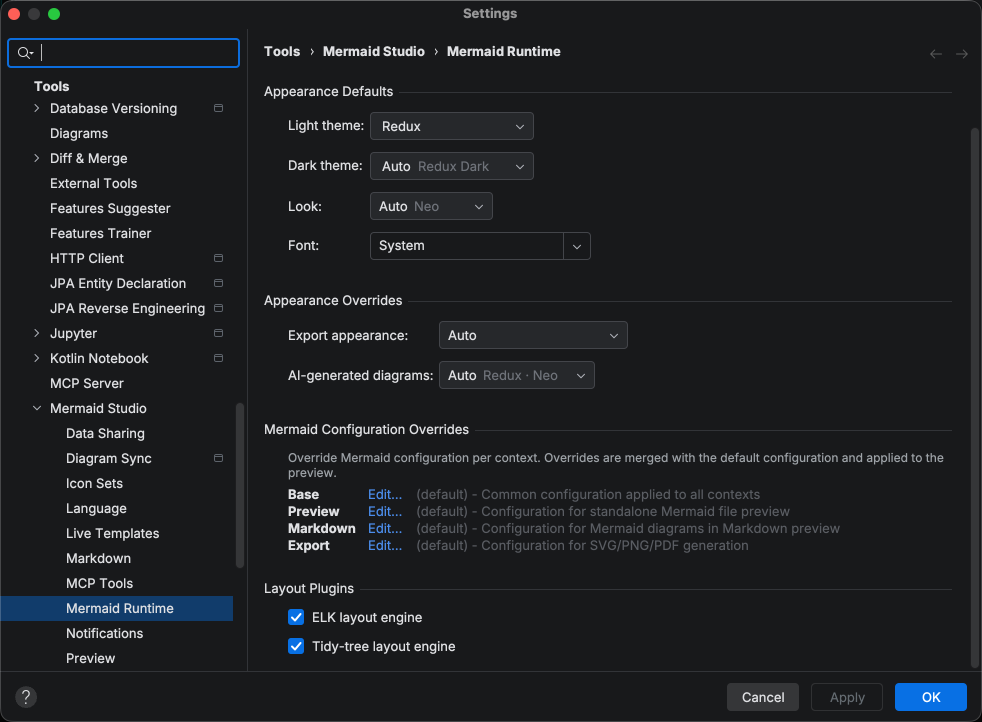
Because the default theme changes on upgrade, a one-time notification announces the new default and offers to keep your previous default instead.
Per diagram, the preview Theme and Look toolbar buttons combine into a single Appearance dropdown. The dropdown also sets the diagram font, so you can pick a web-safe preset or any custom family alongside the theme and look in one place.
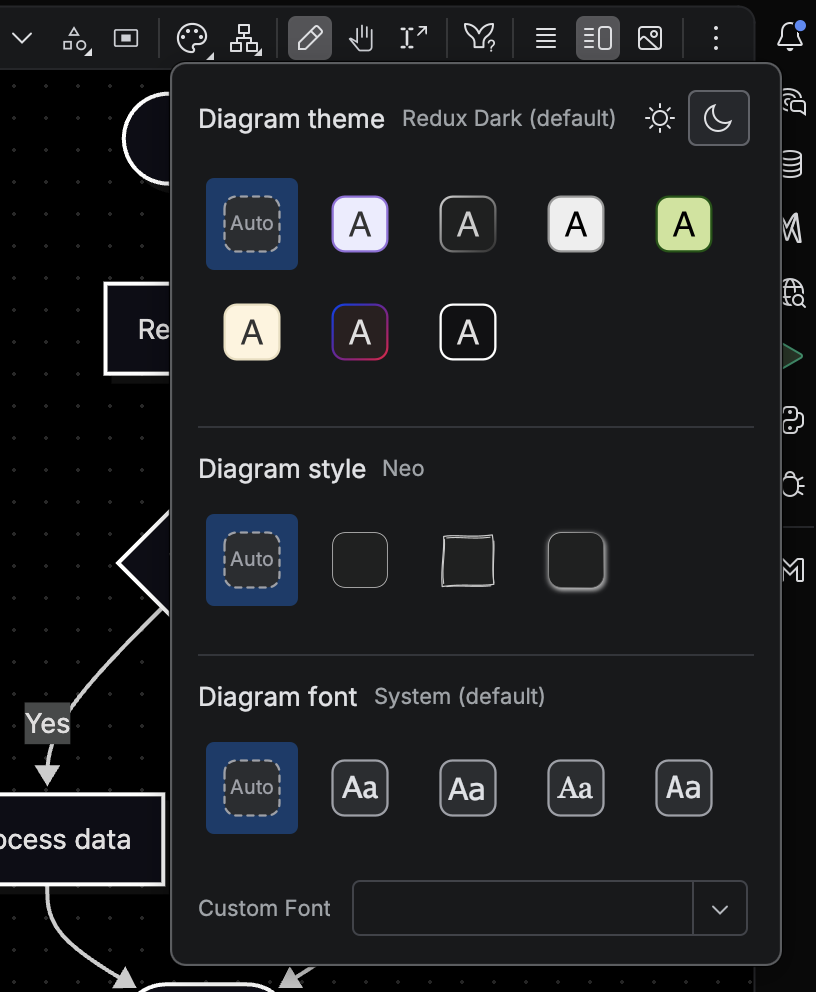
Additionally, diagrams render inline in Markdown preview by default instead of inside a code fence container.
Remote development support
Section titled “Remote development support”The plugin has been rearchitected for the remote development pattern and is now supported in remote development setups, excluding JetBrains Gateway. See Remote development for the supported configurations and current limitations.
The color picker is now free for everyone
Section titled “The color picker is now free for everyone”The color-picker gutter icons are now free for all users on every diagram type. Click the swatch next to any hex or CSS color literal to open the IDE color picker and edit the value in place.
More templates, samples, and editing upgrades
Section titled “More templates, samples, and editing upgrades”This release also expands templates, samples, and preview editing.
- More live templates join the bundle for ER, C4, and Kanban diagrams; the Live Templates page covers the shared mechanics.
- C4 starter samples ship for the Container, Component, Dynamic, and Deployment diagram types in the Insert Sample Diagram picker.
- Architecture preview-to-source navigation lets you click an element in the live preview to jump to its definition, and is no longer marked experimental. See Visual editing.
- Flowchart subgraph ungroup lifts a subgraph’s members to the parent scope from the preview with
Command + Shift + G CmdShiftG Control + Shift + G CtrlShiftG . - Rebindable edit-mode shortcuts: preview edit-mode actions (select all, parent, children, siblings, zoom, and the rest) are now standard IDE actions, so they appear under Settings > Keymap and can be rebound.
- Markdown renders inline by default, so embedded Mermaid diagrams appear in the flow of the document without extra configuration.
- New inspections flag unresolved
classandclicktargets in state diagrams, surplus XY chart data points dropped at render time, inconsistent TreeView indentation, and>child combinators inconfig.themeCSSthat silently drop the whole block; an unresolved class-diagramclick/link/callbacktarget is now a warning on 11.16.0+ where it renders and stays an error on older runtimes.
The clip below selects a subgraph in the preview and ungroups it, lifting its members to the parent scope as the source updates.
Compatibility
Section titled “Compatibility”The minimum required IDE version is now 2025.3.
Changelog
Section titled “Changelog”- Remote development support: the plugin has been rearchitected to support the new remote development pattern and is now supported in remote development setups (excluding JetBrains Gateway)
- Default appearance settings: choose a light/dark theme (now redux/redux-dark by default), look, and font that adapt automatically, with optional matching on export and print
- New diagram type: Cynefin framework (
cynefin-beta) with highlighting, validation, completion, folding, formatting, and spellchecking - New diagram type: Railroad syntax diagrams (
railroad-beta), including IR, EBNF, ABNF, and PEG notations - New diagram type: Swimlane (
swimlane-beta) with the full Flowchart feature set, plus drag-to-reorder lanes in the live preview - Bundled Mermaid 11.16.0 and made it the default rendering version
- ER diagrams: support for nullable attribute types (e.g.
string?) and backtick-escaped attribute names (e.g.`order id`) - XY charts: support for per-data-point text labels (e.g.
bar [10 "Q1", 20 "Q2"]) - TreeView diagrams: Mermaid 11.16.0 syntax — bare (unquoted) node names, box-drawing tree input, and
:::class/icon()/## descriptionannotations - TreeView diagrams: inspection flagging inconsistent indentation (mixing whitespace and box-drawing guides)
- Architecture diagrams: support for the
align row|columndirective to line up services and junctions, with completion for the axis and members - YAML frontmatter delimiters may now be indented, as long as the opening and closing
---use the same indentation - Frontmatter config completion for Mermaid 11.16.0 options: pie
donutHole/legendPosition/highlightSlice, XY chart axislabelRotation, and architectureseed - Frontmatter config completion now covers Venn and Ishikawa diagrams
- Ungroup a flowchart subgraph in the live preview with Cmd/Ctrl+Shift+G, lifting its members to the parent scope
- Preview-to-source navigation for architecture diagrams: click an element in the live preview to jump to its definition
- Set the diagram font from the Appearance dropdown, choosing a web-safe preset or any custom family
- Bundled live templates for ER, C4, and Kanban diagrams
- Starter samples for the C4 Container, Component, Dynamic, and Deployment diagram types
- Inspection warning for
>child combinators inconfig.themeCSS, which silently drop the whole themeCSS block at render time - State diagrams: the unresolved-state inspection now flags
classandclicktargets that don’t resolve to a declared state - XY charts: inspection warning when a
bar/lineseries has more data points than the band x-axis has categories, since the surplus points are silently dropped at render time - Help buttons on the Mermaid Studio settings pages open the matching documentation page
Changed
Section titled “Changed”- Minimum required IDE version raised to 2025.3 (build 253)
- The color-picker gutter icons are now free for all users on every diagram type
- On upgrade, a one-time notification announces the new default theme and offers to keep your previous default
- Combined the preview Theme and Look toolbar buttons into a single Appearance dropdown
- Restyled the style preset swatches as rounded squares to match the Appearance dropdown tiles
- Live templates settings tree now starts fully collapsed
- Navigation from preview is no longer marked experimental
- Preview edit-mode shortcuts (select all/parent/children/siblings, zoom, etc.) are now standard IDE actions, so they appear under Settings > Keymap and can be rebound
- Plugin loads in IDE configurations where the Markdown plugin is absent or disabled; Markdown-fence Mermaid integration silently no-ops when Markdown is unavailable
- Mermaid diagrams in Markdown now render inline by default
- Class diagrams: an unresolved
click/link/callbacktarget is now a warning on Mermaid 11.16.0+ (where it renders) and stays an error on older runtimes (where it can break rendering) - “Fit Content” action now scales the diagram up to fit the preview pane, not just scale down
- Reduced jitter from modifying or selecting elements on the edge of preview pane viewport
Removed
Section titled “Removed”- The per-editor preview Background override action; the background now follows the saved Background setting
- TreeView diagrams now preview on a light canvas in dark mode, since they ship no dark-theme styling, instead of rendering light content on a black background
- The IDEA build is now marked incompatible with Android Studio, so Android Studio users install the dedicated Android Studio build instead of the IDEA artifact
- Markdown preview max-width setting now constrains diagram width (previously ignored)
- Fixed several instances of diagram completions triggering outside the diagram body
- Element Style pane no longer drifts to a neighboring element after an edit reorders statements, which could send the next property change to the wrong target
- C4 diagrams no longer over-indent new top-level statements when pressing Enter
- Insert Sample Diagram now formats inserted Mermaid sources with the current code style before replacing standalone files or Markdown fences
- Insert Sample Diagram now preserves the Markdown fence’s indentation on every inserted line, so nested list and blockquote fences stay inside their surrounding structure
- Reformat Code now normalizes YAML frontmatter alongside the diagram body for Mermaid fences hosted inside a Markdown list item, instead of over-indenting it
- Improved YAML formatting and indentation in frontmatter of standalone Mermaid diagrams
- Diagram export and image generation no longer briefly flash the rendered diagram on screen on Linux/Wayland
- Sankey diagrams in Markdown fences now get YAML completion and schema validation in their frontmatter blocks, matching every other diagram type