
What's new in Mermaid Studio 2026.3.5?
Released:
Mermaid Studio 2026.3.5 focuses on performance improvements, Entity Relationship (ER) Diagram grammar fidelity, and improving compatibility with the bundled JetBrains Mermaid plugin. As a result of the compatibility work, custom syntax highlighting, inspection, and keyboard shortcut settings may need to be reapplied manually.
Additionally, this release includes updated versions of the bundled icon sets.
Highlights
Section titled “Highlights”ER diagrams
Section titled “ER diagrams”Several improvements have been made to entity identifier and attribute parsing to better match what Mermaid.js allows and to eliminate syntax error cascades.
This includes syntax such as attributes containing . or parenthetical suffixes (e.g., decimal(1,3)).
Additionally, identifier validation has been reworked to reduce false-positives when renaming.
The full list of fixes can be found in the fixed section.
Completion inside an attribute block picks up several refinements.
Types follow the casing you type, so VA completes to VARCHAR and va to varchar.
Types harvested from elsewhere in the file arrive without their parameters, turning an existing decimal(10,2) into a decimal suggestion.
Accepting a type inserts a trailing space so you continue into the attribute name, and the entity name you’re partway through typing is no longer offered back to you unless an entity by that name already exists.
The Mermaid Studio namespace
Section titled “The Mermaid Studio namespace”Mermaid Studio’s actions, color keys, inspections, and live-template contexts previously lived in a shared Mermaid namespace.
The Mermaid plugin JetBrains bundles with IntelliJ IDEA 2026.2 uses that namespace as well, so this release moves every Mermaid Studio identifier onto its own.
Inspection and intention trees now group under Mermaid Studio rather than mixing into the bundled plugin’s entries.
Because the identifiers changed, some preferences attached to the old ones reset once on upgrade:
- Custom keyboard shortcuts on Mermaid Studio actions
- Notification display preferences
- Status bar widget visibility
- Custom colors set on Mermaid Studio attributes in Color Scheme settings
- Customized severities and enablement for Mermaid Studio inspections in inspection profiles
Additionally, custom live templates scoped to the old Mermaid contexts lose their scoping and need to be rescoped manually to be reactivated. The context names you pick from are unchanged, so reopen each affected template under Settings > Editor > Live Templates and select its context again in the Applicable in row. Bundled templates are unaffected.
Unified color settings page
Section titled “Unified color settings page”Color attributes for all diagram types now live on a single Mermaid Studio page under Editor > Color Scheme, instead of a separate page per type.
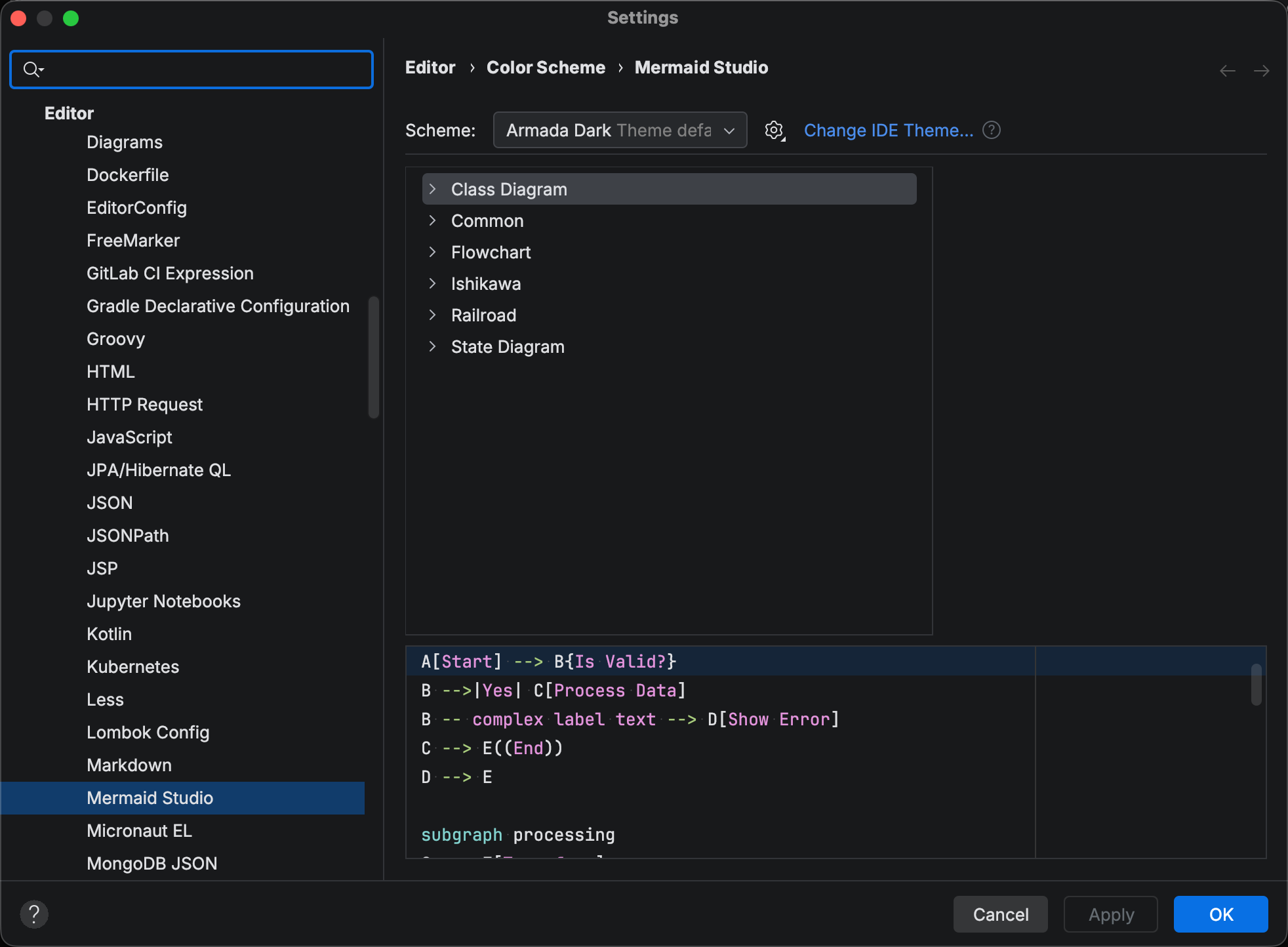
Common holds the attributes shared across diagram types, and each type that exposes elements of its own gets a group beside it. Diagram types without a group draw their colors from Common.
Frontmatter folding
Section titled “Frontmatter folding”You can now fold YAML frontmatter blocks, not just the YAML entries themselves. This means you can now fold frontmatter down to a single line in the editor. To have frontmatter collapsed by default whenever a file opens, enable Frontmatter under the Mermaid Studio group in Settings > Editor > General > Code Folding.
Changelog
Section titled “Changelog”- Code folding for YAML frontmatter blocks, with an option to collapse it by default (Editor > General > Code Folding)
Changed
Section titled “Changed”- Bundled icon sets refreshed to current upstream: AWS Architecture Icons 20.0 to 23.0, Azure Architecture Icons V21 to V24, Font Awesome 7.1.0 to 7.3.1, SVG Logos and Google Cloud Platform to the latest snapshots
- ER diagrams: attribute type completions use adaptive casing for built-in types (
VAtoVARCHAR,vatovarchar), types harvested from the file drop their parameters (decimal(10,2)todecimal), and an already-fully-typed name is no longer suggested - ER diagrams: completing an attribute type inserts a space after it, so typing flows straight into the attribute name
- ER diagrams: entity completions no longer offer back the half-typed name you are currently writing, unless the same entity exists elsewhere in the diagram
- ER diagrams: typing inside an entity’s attribute block reparses only that block instead of the whole file, and a syntax error inside one block no longer disturbs the parse of sibling entities and relationships
- Color Scheme settings: every diagram type now lives under a single Mermaid Studio page, one group per type, instead of a separate page each
- Improved performance when opening files
- Internal identifiers moved to a Mermaid Studio namespace so the bundled JetBrains Mermaid plugin can never clash with them. One-time effects: custom shortcuts on Mermaid Studio actions, notification display preferences, and status bar widget visibility reset; user live templates attached to the old Mermaid contexts need to be rebound to the new Mermaid Studio context
- All diagram color keys moved to the same namespace; any custom colors set for Mermaid Studio attributes in Color Scheme settings reset once
- All inspections moved to the same namespace; customized severities and enablement for Mermaid Studio inspections in inspection profiles reset once
- Settings trees (Inspections, Intentions) now group our entries under Mermaid Studio instead of Mermaid, so they no longer mix with the bundled JetBrains Mermaid plugin’s entries
- ER diagrams: identifiers with underscores (
my_type,customer_id,CUSTOMER_ORDER) are now single words for navigation, rename, and highlighting instead of being split into fragments at each underscore - ER diagrams: dots are accepted in entity identifiers, and dotted attribute types and names (
my.Type,numeric.value) are single words for rename and navigation, matching how Mermaid.js lexes them - ER diagrams: a duplicate
erDiagramkeyword in the document body is highlighted as the keyword and flagged as an error, matching Mermaid.js, instead of silently becoming an entity - ER diagrams:
__text__now renders as bold in highlighting, matching Mermaid.js, instead of italic;_text_stays italic - ER diagrams: attribute types and names accept Mermaid.js’s full word syntax, including dots, word commas, and parenthesized parameters (
decimal(10,2),enum(a,b,c)), instead of showing false errors - ER diagrams: generic type runs accept the full content Mermaid.js accepts, including braces, quotes, symbols, digits, and commas inside or attached to the tilde run, instead of being flagged as errors
- ER diagrams: PK/FK/UK detection matches Mermaid.js exactly, so words like
uk_id,id[PK], anda.PKare no longer mistaken for keys, and invalid placements likePK-xare flagged just as Mermaid.js does - ER diagrams: a misplaced token in an attribute line produces one localized error at the offending spot instead of cascading errors through the rest of the entity block
- ER diagrams: renaming attribute types and names accepts the same syntax the parser does, and PK/FK/UK are rejected with a clear message instead of the rename silently doing nothing
- ER diagrams: renaming a quoted entity (
"Customer Order") renames inside the quotes instead of stripping them; unquoted entities stay unquoted - Frontmatter indented inside a Markdown code fence is read in place, so appearance resolution, the layout action, and the print and theme transforms no longer fall back to defaults or prepend a duplicate block above the existing one
- When the IDE’s built-in browser fails to start, preview, export, and print now explain what happened instead of failing with an internal error or opening a dialog you cannot use
- The basic-highlighting status bar indicator no longer triggers IDE errors while repainting