
What's new in Mermaid Studio 2026.4.2?
Released:
Mermaid Studio 2026.4.2 adds support for Mermaid.js 12.0.0.
The editor supports the two diagram types Mermaid.js 12 introduces, use case and agentflow, and follows its per-diagram theme, look, and layout settings and its built-in ELK layouts.
This release also marks Mermaid.js parser errors in the editor by default for diagram types with basic highlighting, and lets you zoom and pan a Mermaid diagram right inside the Markdown preview.
Highlights
Section titled “Highlights”Mermaid.js 12.0.0
Section titled “Mermaid.js 12.0.0”Mermaid.js 12.0.0 is now the default runtime, and the 11.13.0 bundle is removed. See the bundled versions for the full list.
ELK is bundled as part of Mermaid.js 12, so the setting for enabling or disabling the ELK plugin has no effect on this runtime version.
This release also introduces the concept of frontmatter evolution with frontmatter changes being pinned to specific Mermaid.js version ranges. As such, the new frontmatter keys added in Mermaid.js 12 are completed and validated when the Mermaid.js 12.0.0 runtime is active but are not exposed when an 11.x runtime is selected.
Use case and agentflow diagrams
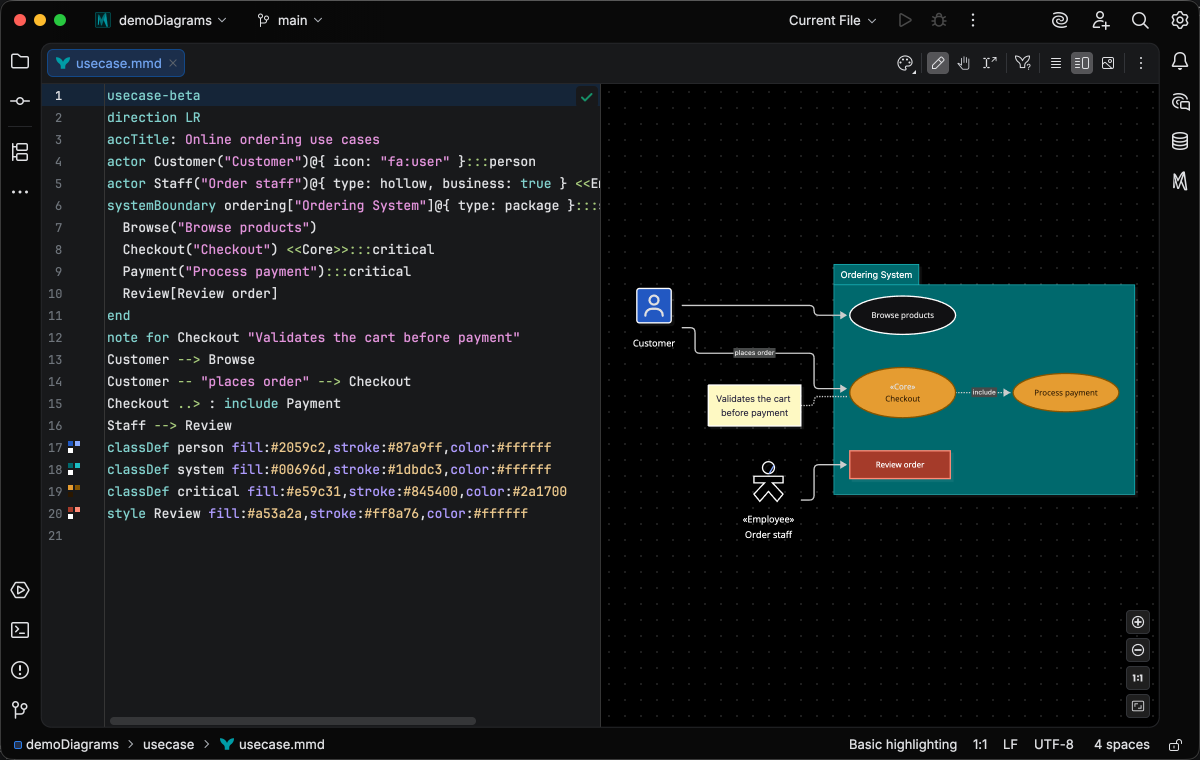
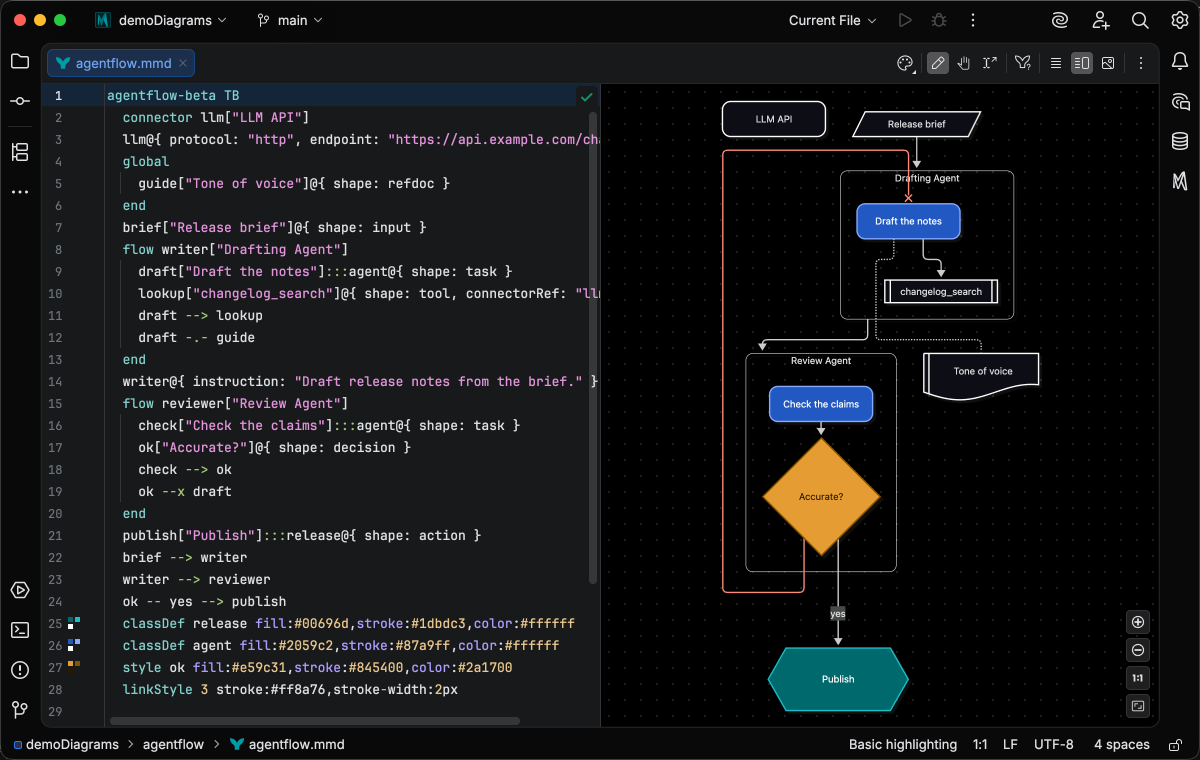
Section titled “Use case and agentflow diagrams”Mermaid.js 12.0.0 adds two beta diagram types, and Mermaid Studio includes editor support for both.
A use case diagram shows the actors of a system and what they can do with it:
An agentflow diagram maps an AI agent workflow, with each agent as a flow container of tasks, tool calls, and decisions:
Both of these diagrams are implemented using Mermaid Studio’s generic language support system, which offers a core set of editing capabilities with “good enough” fidelity without committing to a full language implementation that tracks the upstream grammar exactly. This gives new beta diagram types a higher baseline editing experience from the release that introduces them. It also lets us keep pace with the growing rate of new diagram contributions to Mermaid.js while minimizing the attention diverted from our core roadmap.
Generic language support provides:
- Basic highlighting: token-based highlighting configured for a specific diagram (e.g., diagram-specific keyword and operator highlighting)
- Keyword completions at the start of a statement
- Code folding
- Inserting a closing
endonEnter Enter Enter Enter after a block keyword such assystemBoundary - Brace pairing (highlighting opening and closing structural tokens)
- Generalized support for
classDef,class, andstylestatements, with highlighting, a gutter icon for picking CSS colors, CSS property completion, class renaming, and warnings for unused or unknown classes
Use case and agentflow diagrams also include live templates to scaffold the common statements.
Parser errors for diagrams with basic-highlighting support
Section titled “Parser errors for diagrams with basic-highlighting support”Diagram types with basic highlighting, such as the ABNF and PEG railroad notations and the two new types, now mark Mermaid.js parser errors in the editor by default.
These are errors gathered directly from the live preview as opposed to Mermaid Studio’s own native diagram parsers.
The heuristic error mapper has been updated to support newer Mermaid.js grammars built on Langium or Chevrotain, which report errors in a different format. It also supports marking multiple errors in the editor when the Mermaid.js parser reports multiple errors.
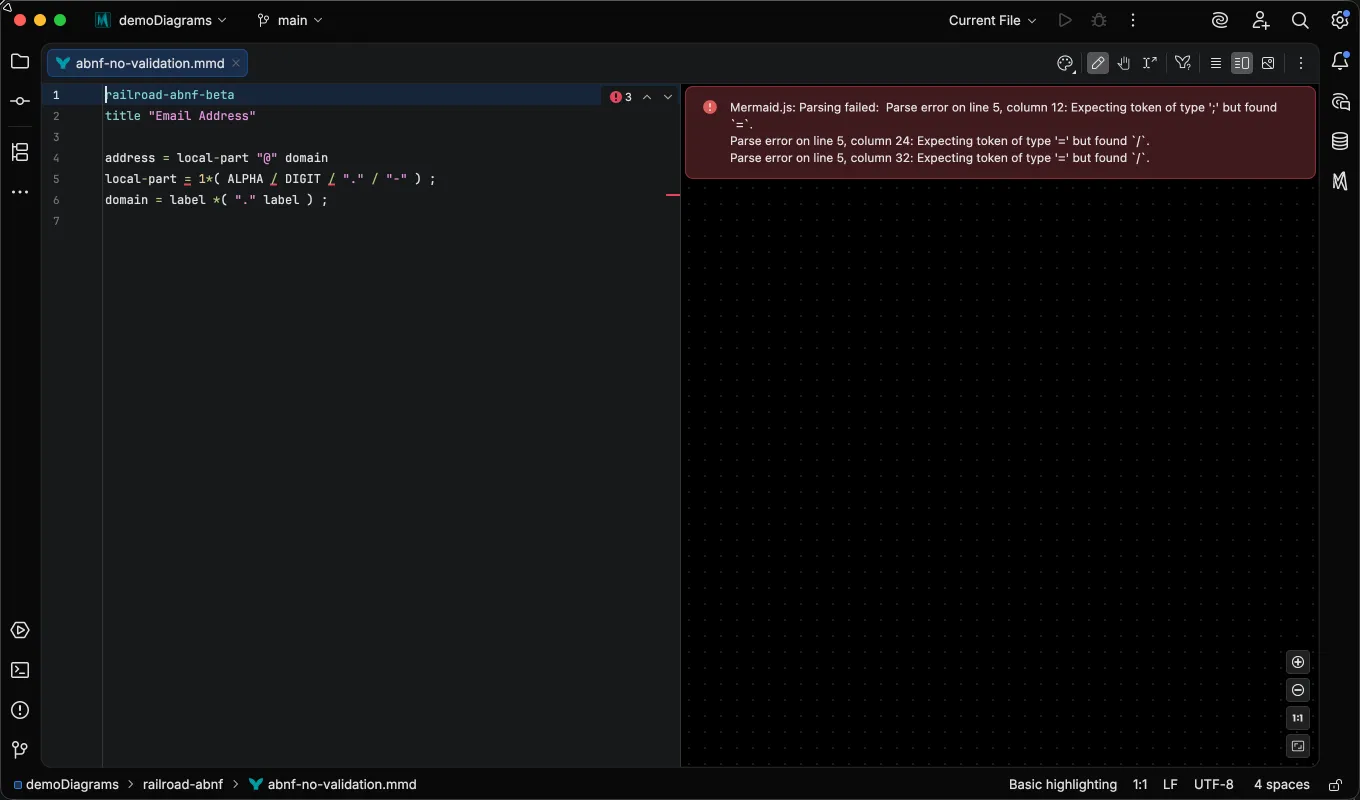
See Mermaid.js parser diagnostics.
Appearance updates
Section titled “Appearance updates”Per-diagram theme, look, and layout
Section titled “Per-diagram theme, look, and layout”On Mermaid.js 12.0, a diagram-scoped key such as config.flowchart.theme takes precedence over the global theme, and Mermaid Studio honors it everywhere diagrams are rendered by the plugin.
The Appearance popup shows the value together with the key that sets it, such as Dark (flowchart.theme).
Picking a value from the popup writes the global key and removes the diagram-scoped one, so you end up with one setting instead of two that disagree.
The Redux Color themes are now available on more diagram types, such as swimlane, venn, and block diagrams, and block diagrams gain the Neo and Hand Drawn looks.
Mermaid Studio applies its own Auto look on every runtime (Neo for the Neo and Redux themes, Classic for everything else), so a diagram on the default or dark theme renders as it did before the upgrade.
See per-diagram theme, look, and layout.
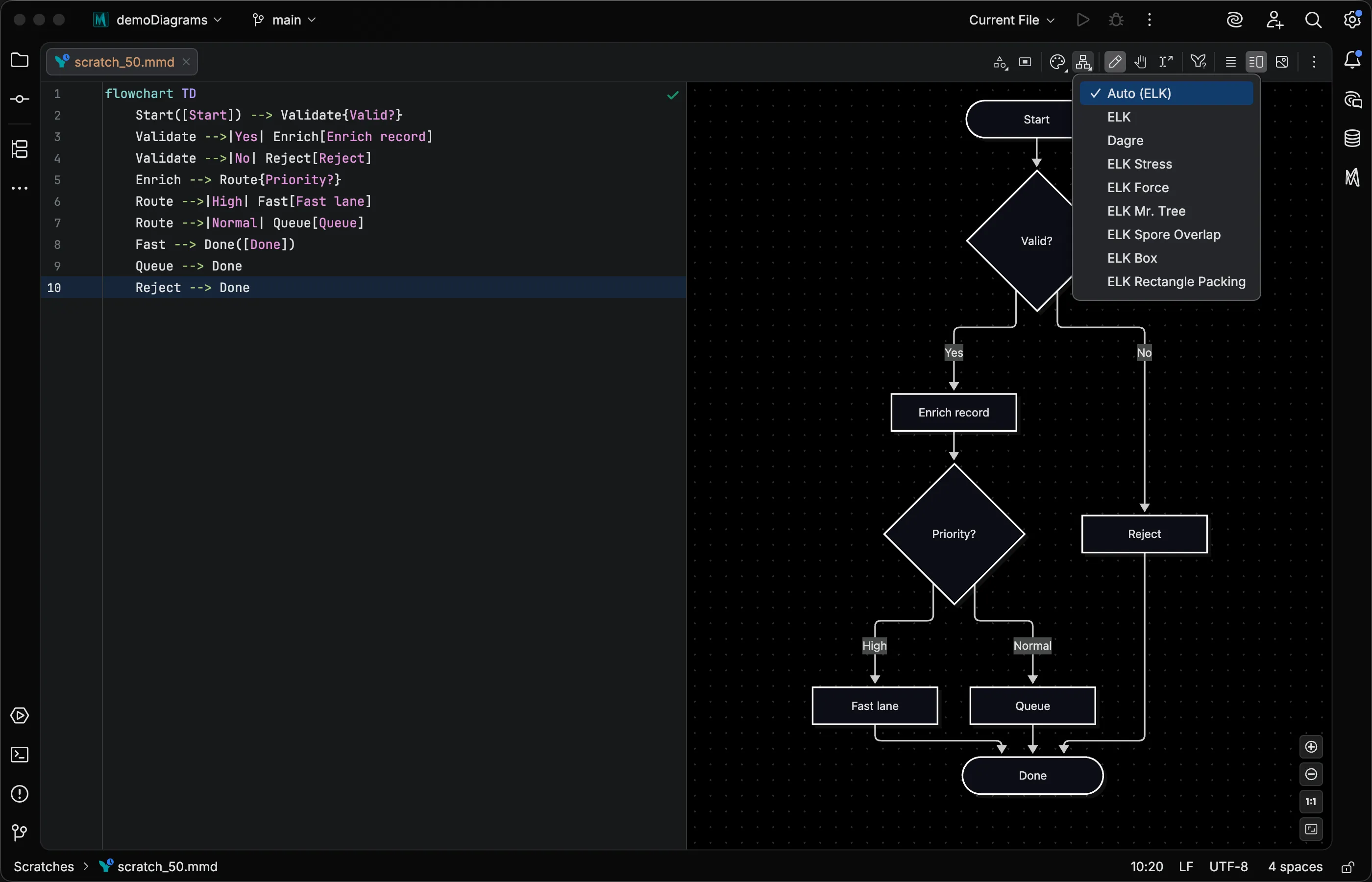
More ELK layouts
Section titled “More ELK layouts”The Layout menu for flowcharts, class diagrams, and several other diagram types adds ELK algorithms such as Stress, Force, and Mr. Tree, plus Box and Rectangle Packing on Mermaid.js 12.0. Its Auto entry names the engine the diagram falls back to, Auto (Dagre) on 11.x and Auto (ELK) on 12.0, so you can tell what you’ll get before you pick.
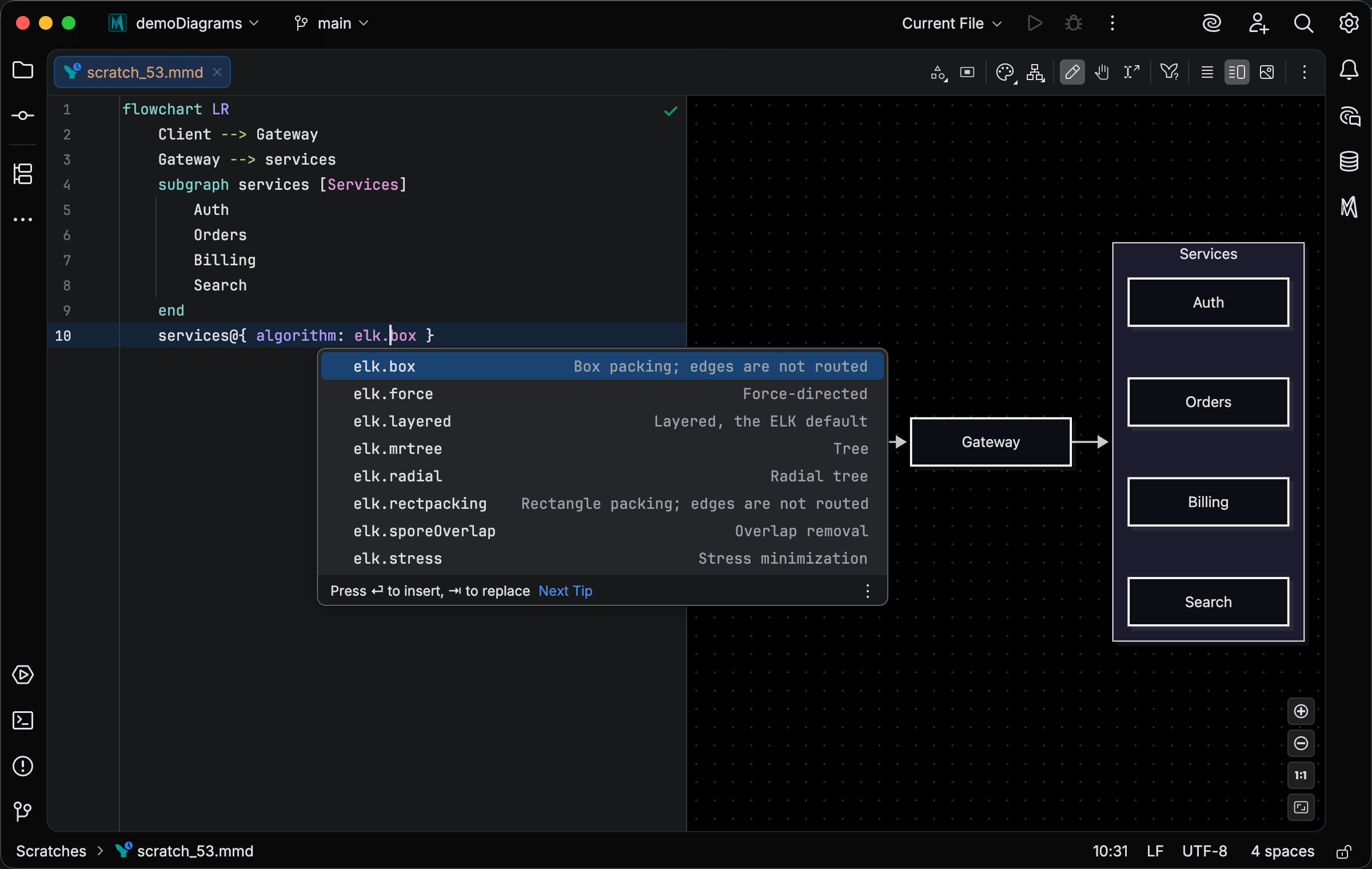
A flowchart subgraph can also take its own layout algorithm with algorithm, while the rest of the diagram keeps the root layout.
Completion lists every algorithm with a short description of what it does, and an unknown name gets a warning:
Migrating defaultRenderer to layout
Section titled “Migrating defaultRenderer to layout”Mermaid.js 12 no longer reads defaultRenderer, so the key is now marked deprecated with guidance on its replacement.
On a 12.0 runtime, an intention action rewrites it to the equivalent layout: elk becomes layout: elk, and dagre-wrapper and dagre-d3 become layout: dagre.
An existing layout is never overwritten; the intention removes the old key instead.
See Frontmatter.
Zoom and pan Markdown fences
Section titled “Zoom and pan Markdown fences”Hover a Mermaid diagram in the Markdown preview and a zoom strip appears in its corner, with zoom out, a zoom level you can type, zoom in, and fit to preview.
A zoomed diagram scrolls inside its own block, and dragging with the middle mouse button pans it, as in a standalone .mmd file.
See Zoom and pan a fence.
Changelog
Section titled “Changelog”- Mermaid.js 12.0.0 bundled as the default runtime version, with 11.14.0 through 11.17.2 still selectable
- Use case (
usecase-beta) and agentflow (agentflow-beta) diagrams (Mermaid.js 12.0): highlighting, folding, statement-keyword completion, Enter closing a block withend, samples, live templates,classDef/class/styleand:::support, and MCP syntax guides - Markdown preview: zoom and pan a Mermaid fence in place from a hover toolbar, and pan a zoomed fence with the middle mouse button
- Appearance: Mermaid.js 12.0’s diagram-scoped
theme,look, andlayoutcount as the diagram’s value in the preview, the Appearance popup, the Layout menu, export, print, and copy; the popup names the key that sets it - Appearance: the Redux Color themes on flowchart, swimlane, class, state, venn, and block diagrams, and the Neo and Hand Drawn looks on block diagrams
- Layout menu: ELK Stress, ELK Force, ELK Mr. Tree, and ELK Spore Overlap for flowchart, class, state, ER, and requirement diagrams, plus ELK Box and ELK Rectangle Packing on Mermaid.js 12.0; the Auto entry names the engine it resolves to
- Flowchart: the subgraph
algorithmproperty (Mermaid.js 12.0) completes with its ELK values, an unknown value gets a warning, and an 11.x runtime flags the key as requiring 12.0 - Frontmatter: keys added in Mermaid.js 12.0 complete and validate on a 12.0 runtime and are hidden while an 11.x runtime is selected
- Frontmatter: an intention rewrites a
defaultRendererentry tolayouton Mermaid.js 12.0 (elkkeeps ELK,dagre-wrapperanddagre-d3becomedagre) and never overwrites an existinglayout
Changed
Section titled “Changed”- Inspections: Mermaid.js parser errors show in the editor by default for diagram types with basic highlighting
- Inspections: Mermaid.js parser errors highlight the token they report for use case diagrams and the Langium-based types (pie, packet, architecture, and others), and each error shows when Mermaid.js reports several
- Diagram types with basic highlighting:
:::is highlighted as an operator, and@,#,~,^,$, and\as punctuation - Frontmatter:
defaultRendereris marked deprecated with guidance to uselayout; Mermaid.js 12.0 ignores the key - Settings: with a Mermaid.js 12.0 runtime selected, the ELK layout engine checkbox shows checked and disabled; the stored choice for 11.x runtimes is kept
- Settings: configuration override layers merge key by key inside a diagram type block (
flowchart:,themeVariables:), so a Preview override no longer replaces the whole block from the Base configuration - Settings: Mermaid configuration overrides are read with the same YAML typing as frontmatter, and
<<merge keys are no longer expanded - Appearance: the Auto look is Neo for the Neo and Redux themes and Classic for every other theme, on every runtime
- Print: on Mermaid.js 12.0, the neutral theme option also replaces a diagram-scoped
theme - C4: a boundary as a relationship endpoint is an error only before Mermaid.js 12.0, which accepts it
- Diagram-type completion is offered only on the diagram’s header line
- Frontmatter: writes from the Layout menu, the Appearance popup, themes, and font settings no longer retype unquoted values such as
on,yes, and dates - Init block conversion: integers in the init JSON no longer become floats in the generated frontmatter
- Flowchart: navigation and editing in the preview work for diagrams that start with
flowchart-elk - Preview: switching to a diagram type with a different Auto look applies that look under a White, Black, or Match editor background too
- Editor: changing a file’s diagram type keyword reparses it once instead of once per open project, and a keyword changed while the file was closed takes effect when the file is opened again
- Markdown preview: the buttons on a Mermaid fence show their tooltips in the IDE language again
- Markdown preview: a short Mermaid fence no longer shows a scrollbar at rest
- Inspections: a Mermaid.js parser error after an entity code such as
#9829;, or on an indented first line, highlights the right column
Removed
Section titled “Removed”- Mermaid.js 11.13.0 bundle